How to Block AI Crawlers and Keep Your AI Search Traffic
We read a week of our own bot traffic and checked every AI crawler against its owner's IP list. One in seven GPTBots wasn't GPTBot. Here's how to block the right ones.

This week I pulled seven days of bot traffic for publishmyblog.com out of Cloudflare. Then I checked every AI crawler against the IP list its owner publishes.
About one in seven requests calling itself GPTBot didn’t come from OpenAI.
Every visit claiming to be Claude-SearchBot was an impostor.
Most “block AI crawlers” guides skip that part. They hand you a list of 40 names to paste, and some of those names are the bots that put you in ChatGPT and Perplexity answers.
The short version: block the job, and leave the company alone. Most AI companies run a training bot, a search bot and a fetcher that visits when a user asks.
Disallow the first, keep the second, then enforce it at your CDN and watch your logs for fakes.
What we checked
All of this ran on publishmyblog.com on 13 November 2026, using Cloudflare’s analytics for 6 to 12 November. That’s about 130,000 requests.
AI bots made several thousand of them. The busiest names:
- Applebot made about 840 requests.
- OAI-SearchBot, Meta’s crawler and Amazonbot made 650 to 700 each.
- ChatGPT-User, ClaudeBot and GPTBot followed at 400 to 650.
Then I matched each claimed visit’s IP address against the owner’s published list. OpenAI, Anthropic, Perplexity, Google and Apple publish JSON files; Amazon is checked by reverse DNS.
| User agent claimed | Requests | From the owner’s published addresses |
|---|---|---|
| Applebot | 842 | 795 (94%) |
| OAI-SearchBot | 689 | 619 (90%) |
| Amazonbot | 664 | 627 (94%, reverse DNS) |
| ChatGPT-User | 651 | 583 (90%) |
| ClaudeBot | 442 | 376 (85%) |
| GPTBot | 407 | 346 (85%) |
| Googlebot | 349 | 249 (71%) |
| PerplexityBot | 107 | 40 (37%) |
| Claude-SearchBot | 46 | 0 |
| Claude-User | 34 | 0 |
Where did the misses come from? Mostly from four Google Cloud machines that sent about 750 requests under 16 different bot names.
They posed as ClaudeBot, GPTBot, Googlebot, bingbot and a dozen more. Real crawlers don’t rotate names like that.
An address outside the list doesn’t prove a fake on its own. But a “Claude-SearchBot” on a rented Google Cloud box that turns into “Bravebot” a minute later isn’t Anthropic.
Two smaller findings:
- OAI-SearchBot fetched our robots.txt 88 times that week and ClaudeBot 64 times.
- Amazonbot never asked for it. That fits Amazon’s note that it may use a copy cached in the last 30 days.
- Our own file names eight AI bots but not Claude-SearchBot. Our
*group still lets it in, so nothing broke.
Cloudflare’s analytics can sample traffic, so take the counts as close. The percentages are the point.
1. Decide what you’re blocking
Write down what you want before you touch a file. Each goal blocks different bots and costs you something different.
| What you want | What to block | What it costs you |
|---|---|---|
| Keep your content out of AI training, stay in AI answers | Training bots and tokens: GPTBot, ClaudeBot, Google-Extended, Applebot-Extended, CCBot, meta-externalagent | Nothing in search. Google-Extended also stops grounding in Gemini Apps |
| Leave AI answers entirely | The above plus search bots: OAI-SearchBot, Claude-SearchBot, PerplexityBot | Citations and visits from ChatGPT, Claude and Perplexity |
| Cut server load from scrapers | Fakes and unknown bots at the CDN, by IP | Little, if you allow verified crawlers |
| Block everything AI | All of the above at the CDN as well as robots.txt | AI referrals. Some user fetches may still get through |
Google sits apart. AI Overviews and AI Mode are part of Google Search, and Google says robots.txt rules for Googlebot are the control.
Blocking Googlebot takes you out of Google entirely.
List every hostname you run too: www, blog, shop, docs. Each host has its own robots.txt, and Anthropic asks for rules on every subdomain you want out.
2. The AI crawler list, by job
This is what each company’s own documentation says its bots do, checked on 13 November 2026. “Token only” means the name works in robots.txt but never shows up in your logs.
| Company | Training | Search index | Fetches when a user asks |
|---|---|---|---|
| OpenAI | GPTBot | OAI-SearchBot | ChatGPT-User (“robots.txt rules may not apply”) |
| Anthropic | ClaudeBot | Claude-SearchBot | Claude-User (follows robots.txt) |
| Google-Extended (token only) | Googlebot, which covers AI Overviews and AI Mode | Google-Agent and other user-triggered fetchers (“generally ignore robots.txt”) | |
| Perplexity | None, Perplexity says | PerplexityBot | Perplexity-User (“generally ignores robots.txt”) |
| Apple | Applebot-Extended (token only) | Applebot | Not listed |
| Meta | meta-externalagent (training or indexing) | Same bot | meta-externalfetcher (may bypass robots.txt) |
| Amazon | Amazonbot (“may be used to train”) | Amzn-SearchBot | Amzn-User (may not follow all of robots.txt) |
| Mistral | MistralAI-Training | MistralAI-Index | MistralAI-User |
| Common Crawl | CCBot, an open archive anyone can download | None | None |
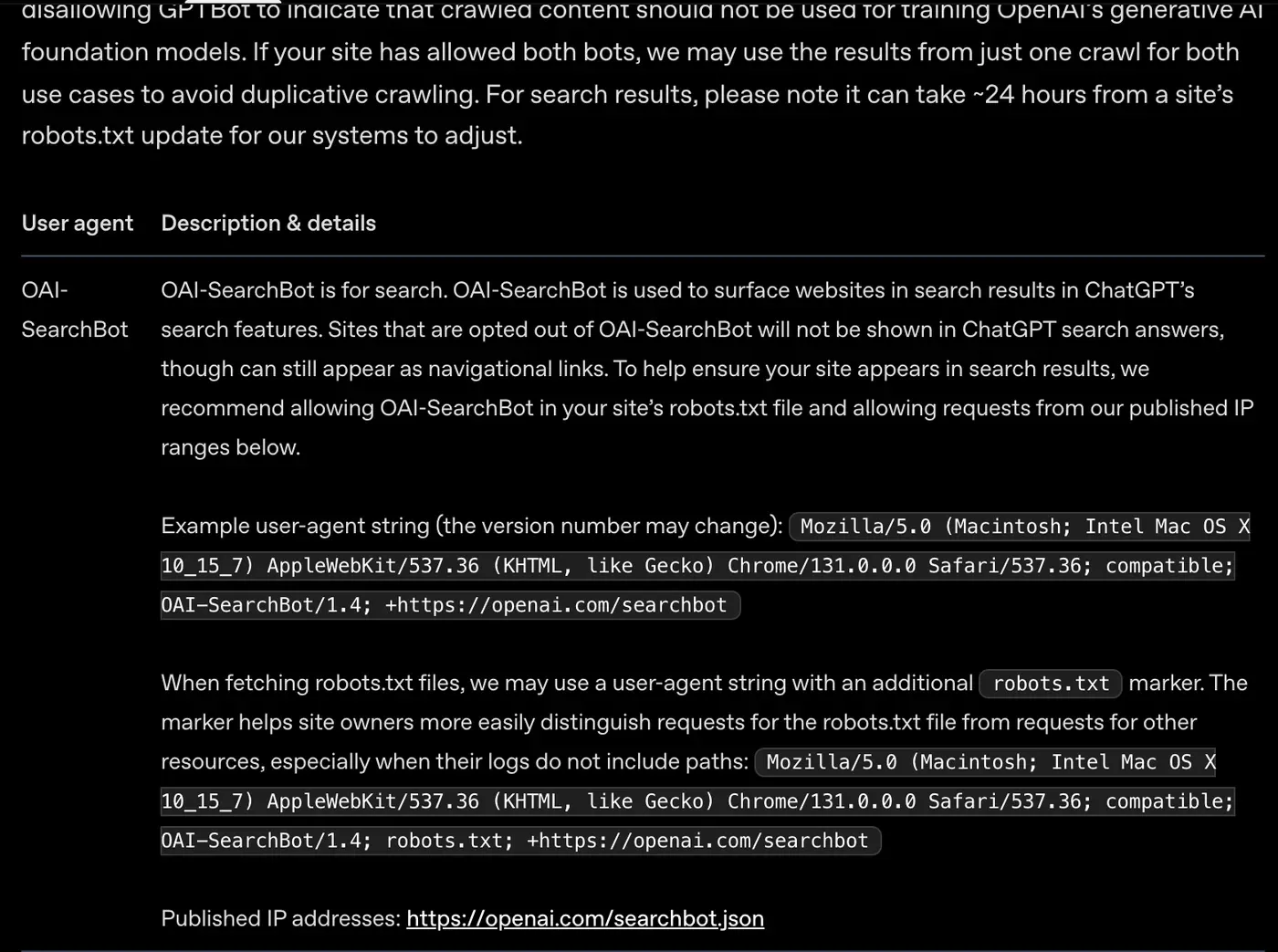
Three rows trip people up.
Google-Extended doesn’t touch Google Search. Google says it “does not impact a site’s inclusion in Google Search”. It covers Gemini training plus grounding in Gemini Apps and Vertex AI.
Meta has no separate search bot. Block meta-externalagent and you stop both jobs.
Old names still sit in copied templates. Anthropic’s page lists exactly three bots, and anthropic-ai and Claude-Web aren’t among them. Keep them if you like, but don’t count on them.
Microsoft has no separate AI crawler. From 1 February 2027, Bing reads new training and grounding preferences as bingbot crawls (step 4).
3. Write the robots.txt rules
robots.txt lives at the root of each host. Your blog subdomain needs its own file. Three templates cover most cases.
To block AI training and stay in AI answers:
User-agent: GPTBot
User-agent: ClaudeBot
User-agent: Google-Extended
User-agent: Applebot-Extended
User-agent: CCBot
User-agent: meta-externalagent
User-agent: MistralAI-Training
Disallow: /
To leave AI answers as well, add these names to the same group:
User-agent: OAI-SearchBot
User-agent: Claude-SearchBot
User-agent: PerplexityBot
Disallow: /
To keep one folder out of training:
User-agent: GPTBot
User-agent: ClaudeBot
Disallow: /members/
Now the catch that breaks real sites. Under RFC 9309, a crawler obeys the group that names it. It only falls back to the * group when no group names it.
Say your * group keeps bots out of /admin/. Add a GPTBot group that only says Allow: /, and GPTBot may now crawl /admin/.
So copy your shared Disallow lines into every named group. Our own file does exactly that.
Changes take time: about 24 hours for OpenAI’s search bot, by OpenAI’s count, while Google caches the file for up to a day and Amazon says the same.
Check it: open robots.txt on every host. Search Console’s robots.txt report shows the copy Google fetched. To test a URL against a bot name, use Google’s open-source robots.txt parser on GitHub.
4. Add the shared “no AI training” line
Want one line that speaks to every AI company at once? It now exists, from an Internet-Draft in the IETF’s AI Preferences work, written at Anthropic on 30 October 2026:
User-Agent: __usage_ai-training
Disallow: /
It’s still a draft. Three companies have said they’ll read it:
- Anthropic began recognizing it on 30 October 2026 and is rolling it out across its services.
- Microsoft will honor it from 1 February 2027.
- Google intends to support it in early 2027, and treats it as a Google-Extended disallow when you don’t name Google-Extended.
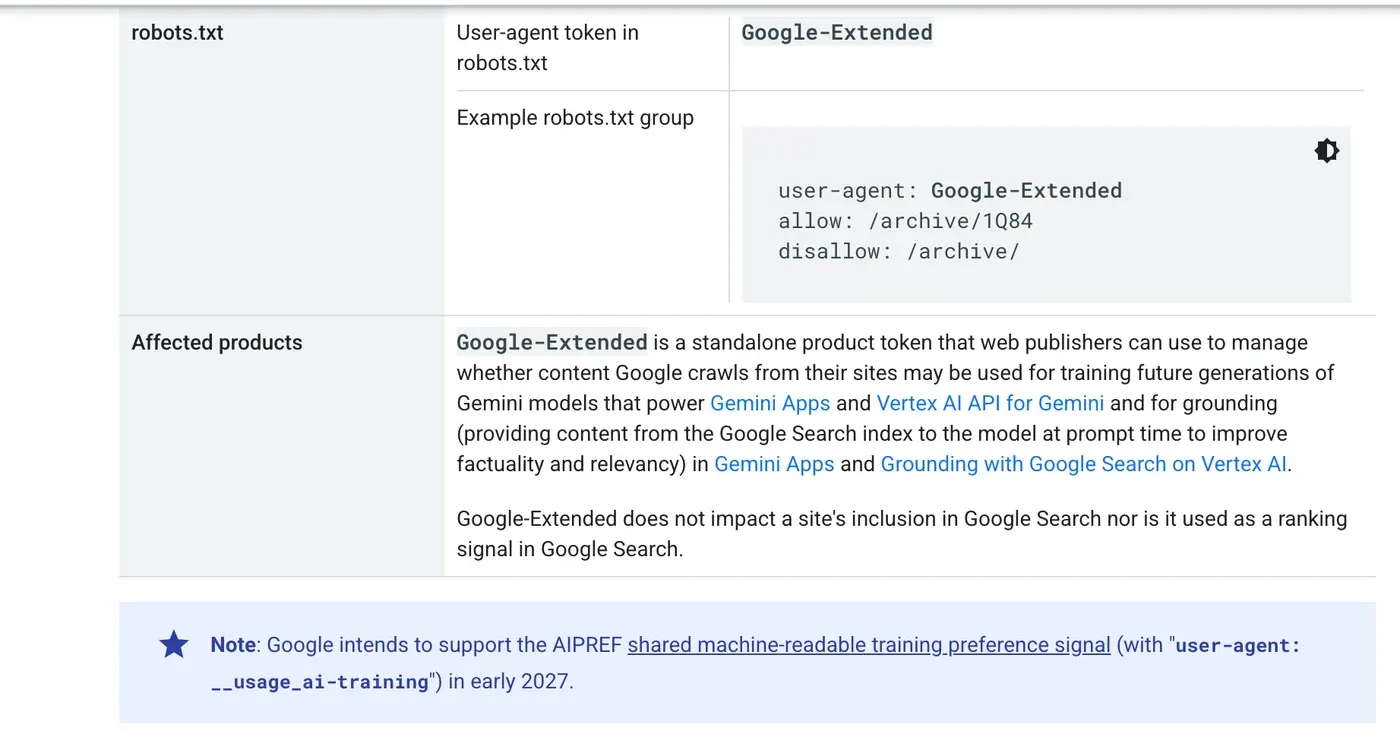
A named bot wins over the shared line. Anthropic says a rule that names ClaudeBot takes priority, and Google-Extended works the same way.
So an Allow: / for ClaudeBot overrides your shared disallow for Anthropic.
The line states a preference about use, and crawlers keep visiting. Bing adds page-level controls on top, like a meta tag with ai-grounding:disallow.
That one keeps a page out of AI answers while it stays in Bing search.
Microsoft is blunt about the cost: grounding Disallow will “significantly reduce” your visibility in AI experiences, so I’d only use it on pages you really want kept out of answers.
5. Enforce it at your CDN or host
robots.txt is a request. RFC 9309 says its rules “are not a form of access authorization”, and Cloudflare’s docs say crawlers can ignore them.
To actually stop a bot, block it before it reaches your pages.
Cloudflare has AI Crawler and Agent access policies, part of AI Crawl Control, which it lists on all plans. You pick an action for Search, Agent and Training traffic.
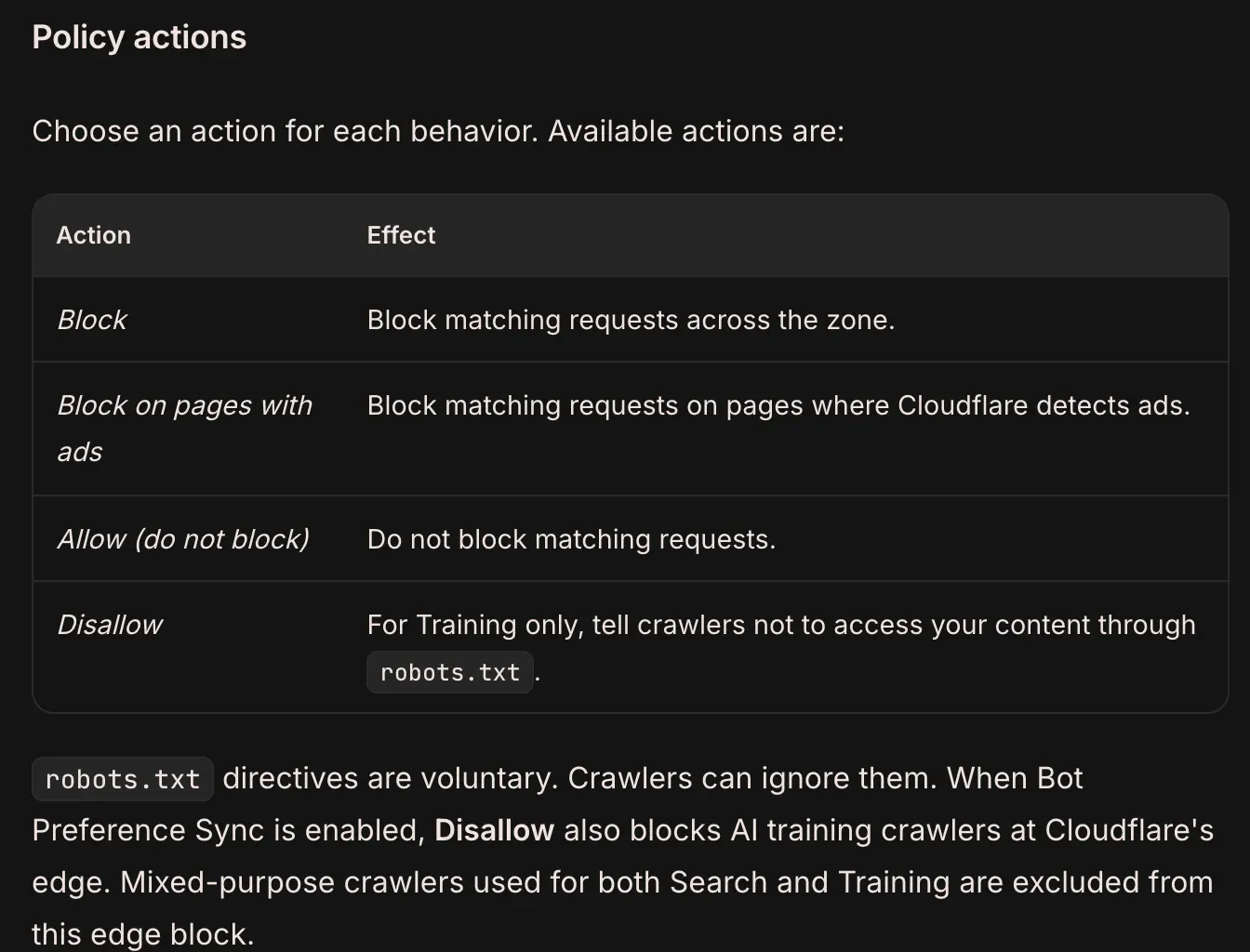
Two details matter:
- Block on Training also hits mixed-purpose crawlers that do search and training. Disallow skips them, so it’s the safer pick if you want to stay in AI search.
- With Bot Preference Sync on, Cloudflare adds its own lines to the top of your robots.txt. Read the file again afterwards.
New Cloudflare domains allow all three by default. We run publishmyblog.com with all three allowed.
Vercel has an AI bots managed ruleset on all plans that logs or denies known AI crawlers. We covered its separate controls for crawlers and assistants when they launched.
On your own server or WAF, match the user agent and the IP range. A name-only rule lets every fake of the bots you allow walk straight in.
Anthropic adds a warning. Blocking its IP addresses can stop it reading your robots.txt, so the opt-out may not stick.
6. Check it worked, and spot the fakes
Give it a day, then check three things.
First, your response. Run curl -I -A "GPTBot" https://yoursite.com/ and look for a 403. It only shows what you send back; it says nothing about whether OpenAI obeys you.
Second, who’s really visiting. Check each bot’s IP against its owner’s list:
- OpenAI: openai.com/gptbot.json, searchbot.json and chatgpt-user.json
- Anthropic: claude.com/crawling/bots.json
- Perplexity: perplexity.ai/perplexitybot.json and perplexity-user.json
- Google: common-crawlers.json and user-triggered-fetchers.json
- Apple: search.developer.apple.com/applebot.json
- Amazon and Common Crawl: reverse DNS to
crawl.amazonbot.amazonorcrawl.commoncrawl.org, then forward to the same IP
Google verifies Googlebot the same way. We wrote about why fake Googlebots are rising with AI scraping.
Third, whether they read your file. Filter your logs for /robots.txt. OpenAI may add a robots.txt marker to the user agent on those requests, which helps if your logs skip paths.
7. What none of this can do
robots.txt and the CDN both act on the next visit. So what can’t they reach?
- What’s already been taken. A training block covers what crawlers collect from now on, and earlier copies stay where they are.
- Some user fetches, the ones a person triggers by asking a chatbot about your page.
- Anything through llms.txt. It’s a reading list for AI tools, and our own llms.txt welcomes them in, which is the opposite of a block and was always meant to be.
noaiandnoimageaimeta tags. The crawler pages from OpenAI, Anthropic, Google, Perplexity and Apple don’t mention them, so I wouldn’t rely on them.
The user fetches matter most. OpenAI, Google, Perplexity and Meta all say their user-triggered fetchers may skip robots.txt.
For AI Overviews, Google’s controls are nosnippet, data-nosnippet, max-snippet and noindex. Careful with the last one: it drops the page from Google entirely.

Why it matters
I’ll say where we stand. publishmyblog.com allows every AI crawler, training bots included.
Being read and cited by AI tools is part of how people find a news site now. Our AI search guide explains why.
That’s our call.
If you sell your writing, a course or research, blocking training makes plenty of sense, and nobody should tell you otherwise.
Blocking by accident is the mistake. Before you paste a “block all AI” list, look for these three names in it:
- OAI-SearchBot, which feeds ChatGPT search
- Claude-SearchBot, Anthropic’s search index
- PerplexityBot, which surfaces and links sites in Perplexity
Those three take you out of AI answers.
The fakes change the job too. A robots.txt rule only works on bots honest enough to read it, so if server load is your problem, fix it at the CDN.
And the rules keep moving.
Microsoft has split training from grounding, Google is backing the shared training line, and Cloudflare now lets you allow or block personal AI agents one by one.
So I’d reread your file every quarter, or add it to your technical SEO audit.
Common Questions
Can I block GPTBot and still appear in ChatGPT search answers?
Yes. OpenAI says each setting is independent: disallow GPTBot to keep content out of model training, and allow OAI-SearchBot so your pages can still be shown and linked in ChatGPT search answers.
Does blocking Google-Extended remove my site from Google’s AI Overviews?
No. Google-Extended only covers Gemini model training and grounding in Gemini Apps and Vertex AI. AI Overviews and AI Mode are part of Google Search, which Googlebot crawls, and Google-Extended doesn’t affect Search inclusion.
Why do AI bots still visit my site after I disallow them in robots.txt?
Usually one of three reasons: the crawler hasn’t refreshed its cached robots.txt (often up to 24 hours), the visit is a user-triggered fetch that may skip robots.txt, or the bot is an impostor using a fake user agent.


