Google: Most 404 Errors in Search Console Don't Need Fixing
Google moved its 404 advice into Search Central and added the parts site owners keep asking about: crawl budget, sitemaps, robots.txt and redirects to the home page.


Google now says most 404 errors in Search Console are normal and won’t hurt your rankings. On 27 November it expanded its crawling errors guide to say when you should fix them.
Ever opened the Pages report and panicked at a long list of 404 errors in Search Console? This one’s for you.
A 404 or 410 for a page that’s gone, or never existed, won’t trigger a manual action. Those are nearly Google’s words.
The changelog presents this as a documentation move, not a ranking change. Google’s changelog entry says it moved its 404 advice from the Search Console Help Center into Search Central.
It added a video too.
What the new 404 errors guidance says
So when should you fix 404 errors in Search Console? First, check that the page wasn’t removed by mistake or moved to a new URL that you forgot to redirect.
After that, Google calls it a user experience and business decision. If people still reach the old URL through links from other sites, you may want to fix it.
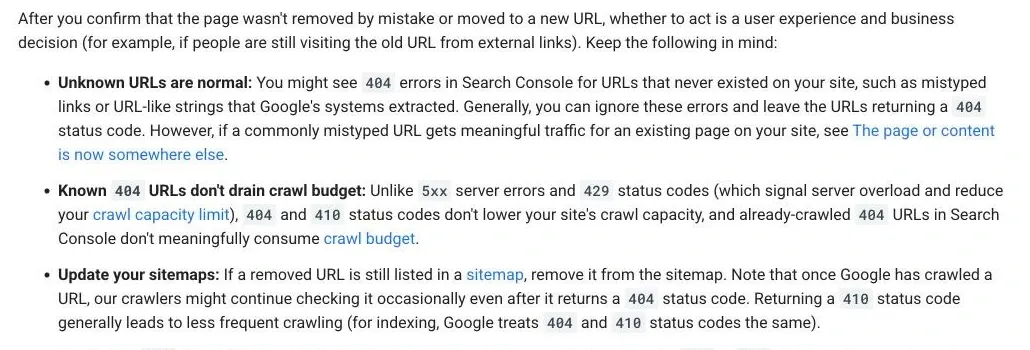
The new section, which Search Engine Roundtable laid out in full, makes five points. Here are the first three:
- Unknown URLs: you can generally ignore 404s for URLs that never existed, unless a mistyped URL gets real traffic for a page you have.
- Crawl budget: 404 and 410 codes don’t lower your crawl capacity, while server errors (5xx) and 429 codes do, because they tell Googlebot your server is overloaded.
- Sitemaps: take removed URLs out of your sitemap.
Is a 410 any better than a 404? Barely.
Google treats 404 and 410 the same for indexing.
Still, a 410 generally means Google checks your dead URL less often. I’d pick 410 when I delete a whole section on purpose.
Two 404 habits you should drop
The first is blocking dead URLs in robots.txt, when Google has to crawl your removed URL to see the 404 and drop it from the index, so if you block it, Google never sees the 404.
The second is the catch-all redirect. Send every missing page to the home page, and Google counts it as a soft 404.
Only redirect when you have a real replacement page, such as the new version of the same guide or the product that replaced the old one, and never just the home page.
Google also updated its What Is a Sitemap page. Leaving a URL out of your sitemap won’t stop Google indexing it if other pages link to it.
To keep a page out of Search, Google says to use noindex.
Then there’s the old stuff. The changelog says Google carried over advice from its 2005 blog posts, including two rules:
- Nested sitemap index files aren’t supported.
- You can’t submit an HTML sitemap in Search Console.
What we checked
We ran three checks on 28 November:
- Google’s old Help article on 404 errors (support.google.com/webmasters/answer/2445990) now 301 redirects to the “page gone” part of the new Search Central guide.
- A made-up URL on publishmyblog.com returned a real 404 status, not a redirect to the home page, which Google’s new guide says is fine for pages that never existed.
- The documentation updates page lists both changes under 27 November.
Why it matters
This takes a job off your list. Most 404s can stay. I still see site owners treat every 404 in Search Console as a bug, and spend hours redirecting URLs that nobody has visited in years.
Here’s the order I’d use:
- Pages you removed by mistake, which I’d treat as the costly case. Bring them back.
- Old URLs that still get visits or links from other sites. Redirect only those, each to a real replacement page.
- Everything else. Leave those 404 errors alone.
On a small site, I’d expect that to take you about an hour, and most of that hour goes on checking which old URLs still have links from other sites pointing at them.
But does your setup send every missing page to the home page? Change it this week.
Then redirect only to a real replacement page, and let everything else return a plain 404 that Google can see and drop from its index.
That said, it’s the same lesson as Google briefly keeping important URLs indexed after 4xx errors. Your status code tells Google what happened.
Make it tell the truth.
New to the Pages report? Our Google Search Console guide shows where it lives.
Common Questions
Do 404 errors in Google Search Console hurt my site’s rankings?
Generally, no. Google’s Search Central guide says returning a 404 or 410 for pages that no longer exist, or never existed, won’t trigger a manual action or harm your site’s overall indexing or ranking.
Should I redirect all my 404 pages to the home page?
Don’t. If you redirect missing URLs to an unrelated page such as the home page, Google counts it as a soft 404. Redirect a removed URL only when an equivalent replacement page exists on your site.
Is a 410 status code better than a 404 for removed pages?
For indexing, Google treats 404 and 410 the same. A 410 generally leads Googlebot to recheck the removed URL less often.
Sources
- Google On When To Fix 404 Errors & Updates 404 & Sitemaps DocsSearch Engine Roundtable (opens in a new tab)
- Troubleshoot Google Search crawling errorsGoogle Search Central (opens in a new tab)
- Latest Google Search Documentation UpdatesGoogle Search Central (opens in a new tab)
- What Is a SitemapGoogle Search Central (opens in a new tab)


