Claude Meetings Puts Claude in Your Google Meet Calls, in Beta
It's more than a notetaker, but it only works in Google Meet, only on business plans, and it keeps Otter and Fireflies as partners.

Anthropic has started rolling out Claude Meetings in beta, and it’s more than a notetaker.
Claude joins your Google Meet call as a visible participant, answers the questions your team asks and builds docs and whiteboards with you while everyone is still talking.
It’s only on Team and Enterprise plans, and only in Google Meet.
Anthropic first named it on 10 November, when TechCrunch reported it with Claude Whiteboards and Claude Sheets. Anthropic’s own launch post is dated 12 November.
What Claude does on the call
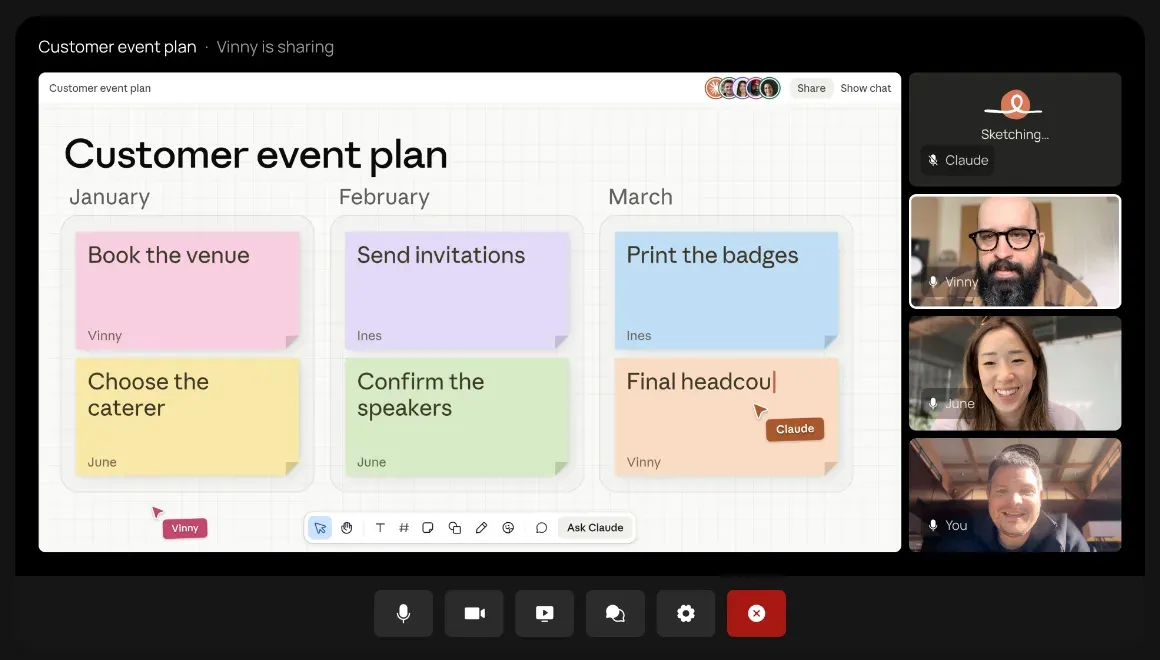
You add Claude from the Meetings page in claude.ai. Or turn on auto-join.
Then you say “Claude” and ask out loud, or type in the Meet chat. By default it answers in writing.
Ask for a doc or a whiteboard and it starts one on the spot, and your teammates on the invite can edit it alongside Claude while the rest of the call keeps going.
It can also use your connected tools, like sending a Slack message. It asks your permission the first time, and that yes sticks.
After the call, the meeting’s own page in claude.ai holds:
- the notes and action items
- the transcript
- every doc and whiteboard Claude built
Teammates on the invite get a recap email with the link.
So what’s missing? Audio.
Claude keeps no audio of your call. Anthropic says support for other video platforms is “coming soon”, but it doesn’t name them or give you a date.
Who gets it, and how you turn it on
On Team plans it’s on by default. An owner can switch it off.
On Enterprise plans an owner has to switch it on, either for the whole organization or only for the roles they pick.
Some companies are left out for now: if your organization uses zero data retention, a HIPAA-ready setup or customer-managed encryption keys, you won’t get Claude Meetings during the beta.
Setup is short. The Claude Help Center lists four steps: go to Meetings, connect Google Calendar, pick a meeting, click “Add Claude”.
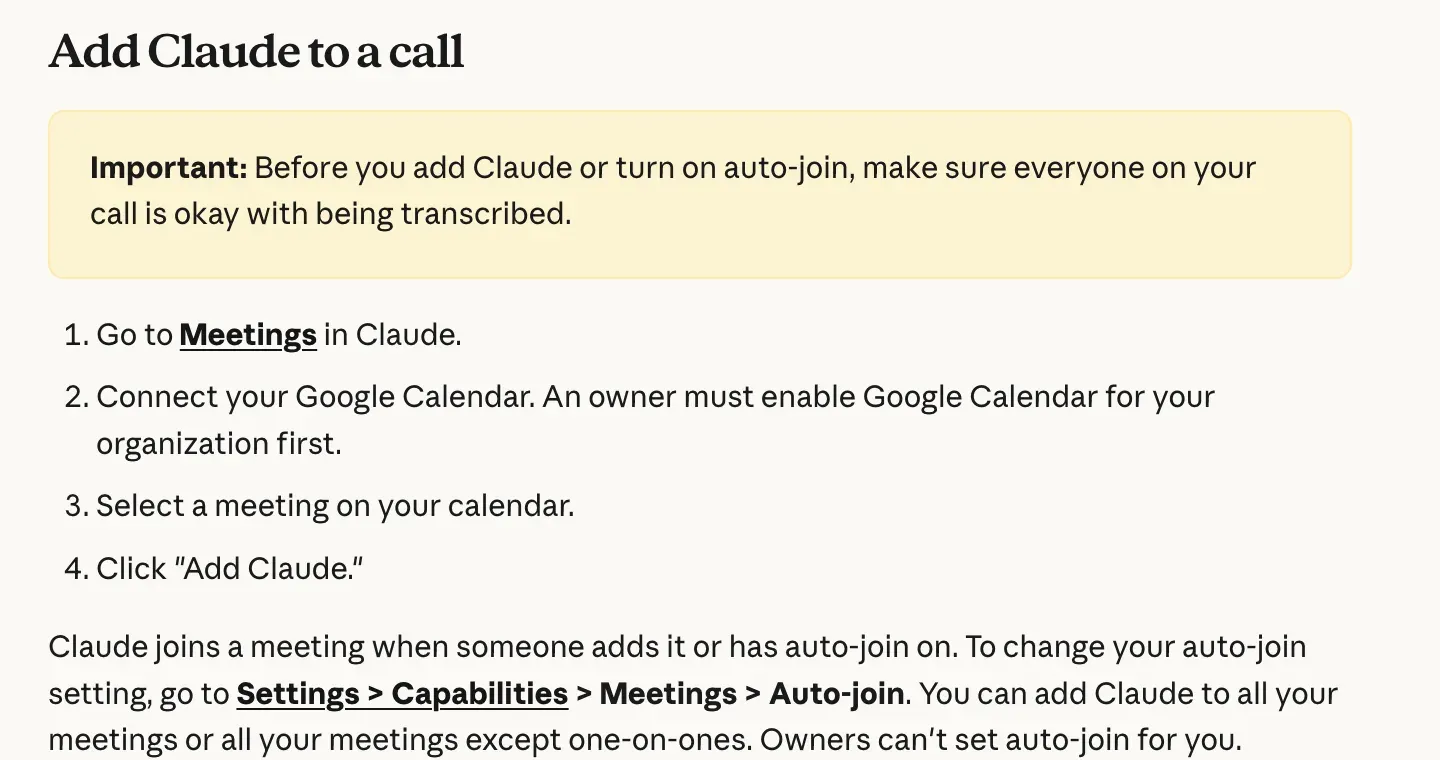
One catch: an owner must enable Google Calendar for your organization first.
Notes, transcripts and plain answers come with your plan, and docs and whiteboards made in a call are free through 10 February 2027.
How it compares with Otter, Fireflies and Gemini
Do your client calls run on Zoom? Then you can’t use it yet, because during the beta Claude Meetings only joins Google Meet calls.
Otter and Fireflies both join Zoom, Microsoft Teams and Google Meet calls.
Google’s own “Take notes for me” writes notes to a Google Doc in the organizer’s Drive, if the organizer’s plan includes it, and the organizer can share it with invitees.
Anthropic’s pitch is the live work: answers, lookups and a first draft while you’re still talking.
And Anthropic isn’t out to bury the notetakers. It lists Otter, Fireflies.ai, Gong, Granola, Attention and Plaud as partners you’ll soon be able to send meeting transcripts to.
What we checked
On 14 November I read Anthropic’s help page for Claude Meetings next to its launch post, line by line, to see whether the two pages tell you the same thing about calls with outside guests.
They don’t quite.
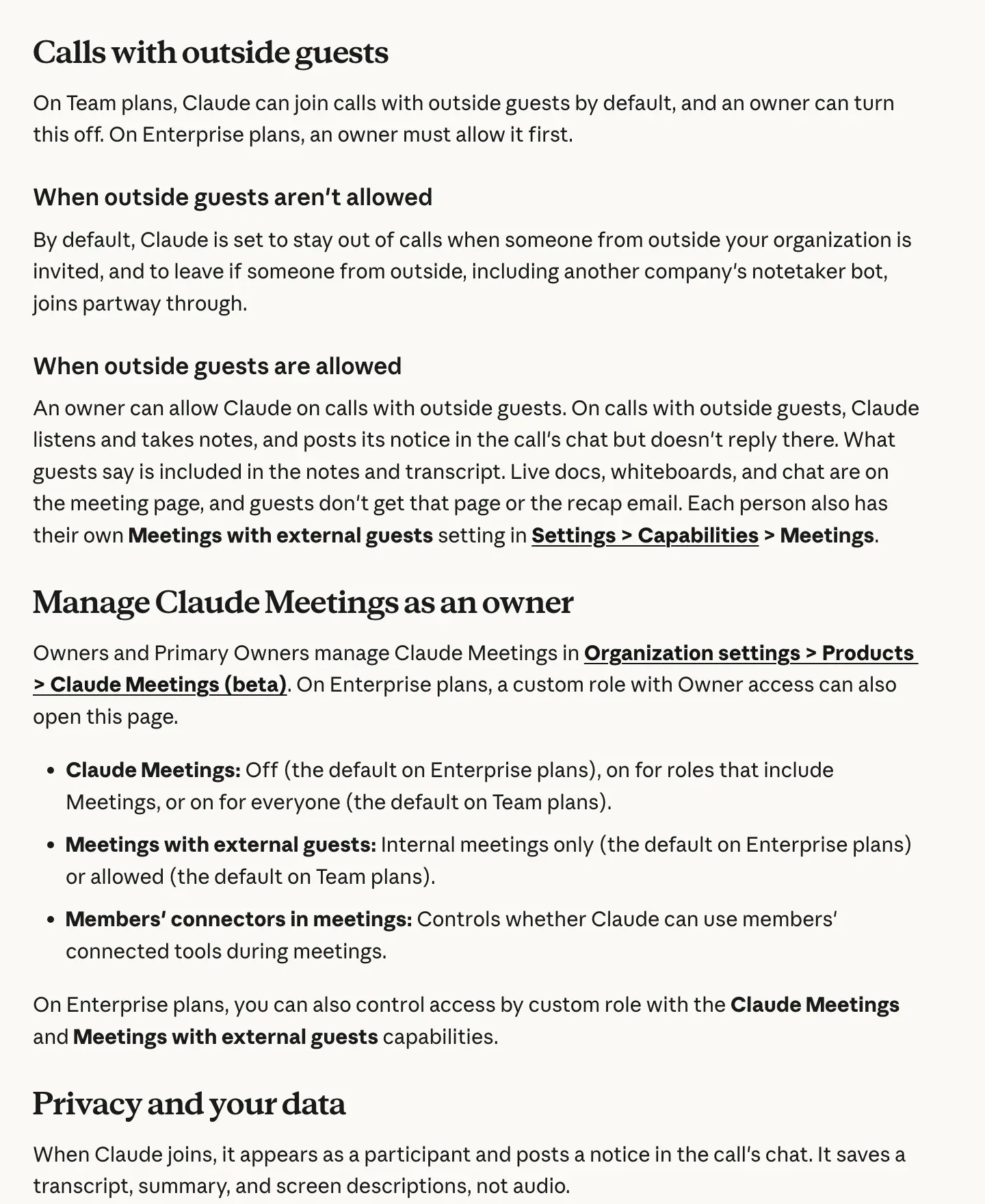
The launch post says that by default Claude stays out of any call where someone from outside your organization is invited, and leaves if an outsider joins partway through.
But the help page says that’s only the Enterprise default.
On Team plans, Claude can join those calls unless an owner turns it off. Odd, right?
Both pages agree on recordings, at least: Claude saves a transcript, a summary and descriptions of whatever gets shared on screen, and it doesn’t keep any audio of the call.
I also read Anthropic’s 10 November post.
Claude Data is Claude Dashboards renamed, out in beta since October and generally available from that day.
Why it matters
Do you run an agency or sell services? Then most of the calls that matter have a client on them, and those are exactly where the guest setting bites.
Anthropic tells you to check everyone is OK with being transcribed before you add Claude.
My read: most small teams will keep their notetaker for now.
Meet-only is a big limit.
But a notetaker that drafts the proposal while your client is still talking is a different kind of product.
Before your next client call, I’d do three things:
- check the owner’s and your own Meetings with external guests setting
- tell the client Claude is transcribing, and get their yes
- try it on an internal call first
Anthropic is shipping fast while it pushes on with its IPO. I’d expect agents like Perplexity’s Teammates to chase the same work.
You’ll see a lot more of this.
Common Questions
Does Claude Meetings work with Zoom or Microsoft Teams?
No. During the beta, Claude Meetings only joins Google Meet calls. Anthropic says support for other video platforms is coming soon but hasn’t given a date.
Does Claude Meetings record the audio of my call?
No. Anthropic’s help page says Claude saves a transcript, a summary and descriptions of shared screens, but not audio. It posts a notice in the Meet chat when it joins.
Can I use Claude Meetings on a Pro or Max plan?
Not yet. The beta is rolling out only on Claude Team and Enterprise plans, and organizations with zero data retention, HIPAA-ready setups or customer-managed encryption keys are excluded for now.
Sources
- Introducing Claude Meetings, now in betaAnthropic (opens in a new tab)
- Use Claude MeetingsClaude Help Center (opens in a new tab)
- Anthropic launches Claude Meetings to turn workplace discussions into plans and tasksTechCrunch (opens in a new tab)
- Claude Whiteboards, Claude Sheets, and Claude DataAnthropic (opens in a new tab)
- "Take notes for me" in Google MeetGoogle Meet Help (opens in a new tab)
- Otter Meeting Agent - AI Notetaker, Transcription, InsightsOtter (opens in a new tab)
- Fireflies.ai | AI Teammate to transcribe, summarize, analyze meetings, Real time AI note takerFireflies (opens in a new tab)


