Amazon Ad Tag Now Sets a First-Party Cookie in North America
It's on by default and waits for consent signals, but Amazon's note and guide don't say what happens on a site that sends none.


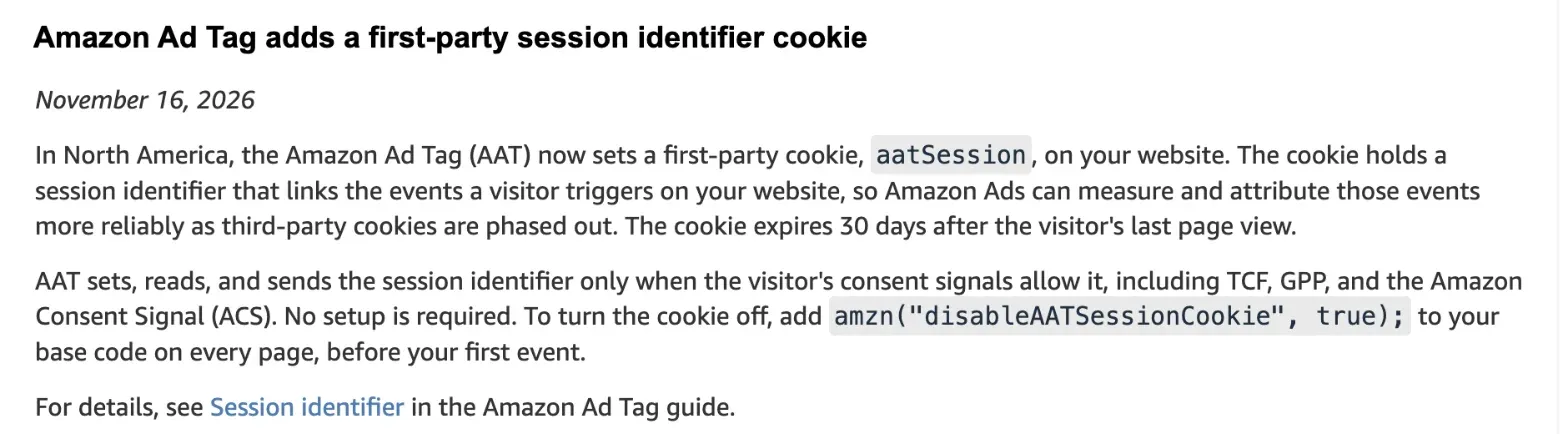
If the Amazon Ad Tag runs on your website, it now sets its own first-party cookie there, called aatSession, according to an Amazon Ads release note dated 16 November.
It covers sites in North America, and it’s on by default, so the decision left to you is whether to keep it.
What the Amazon Ad Tag cookie does
The Amazon Ad Tag (AAT) is the JavaScript snippet advertisers add to their own sites so that Amazon Ads can measure the visits, sign-ups and sales on them.
The new cookie holds a session ID that links one visitor’s events on your site.
Why now? Every event the tag sends to Amazon carries that ID, and Amazon’s release note says this helps it attribute events “more reliably as third-party cookies are phased out”.
Amazon’s Amazon Ad Tag guide sets out the details:
- Availability: North America only (the guide doesn’t say whether that includes Canada and Mexico).
- Lifetime: it expires 30 days after the visitor’s last page view, so every new visit pushes it back.
- Consent: the tag sets, reads and sends the ID only when the visitor’s consent signals allow it (TCF, GPP or the Amazon Consent Signal).
- Setup: none.
The guide also documents amznAref, which keeps an ad click token for 30 days. So Amazon’s guide now lists two first-party cookies the tag can set on your site.
The consent gap
Then there’s the part Amazon leaves open.
PPC Land, which reported the change on 14 November, notes that neither Amazon page says what the tag does when a visitor brings no consent signal at all.
That matters in North America, where not every site runs a consent banner. Does yours?
PPC Land raises a second gap: Safari caps cookies written by scripts at seven days, so the 30-day window could be shorter there if the tag sets it that way.
Amazon’s documents don’t mention Safari, or say how the cookie is written, so for now nobody outside Amazon can tell you whether your Safari visitors keep the full 30 days.
How to turn the aatSession cookie off
The off switch is one line in the tag’s base code, placed before your first event:
amzn("disableAATSessionCookie", true);When it runs, the tag deletes any existing aatSession cookie on your site and stops setting a new one. It also marks each event to show you turned the cookie off.
But it only works on the page where it runs. So put it in your shared header or your tag manager.
Changed your mind? Passing false won’t bring it back. You remove the line.
What we checked
On 16 November we opened Amazon’s GTM template for the Amazon Ad Tag on GitHub. Version 4.1 went in on 5 November (UTC), with the change note “Add aatSession cookie opt-out”.
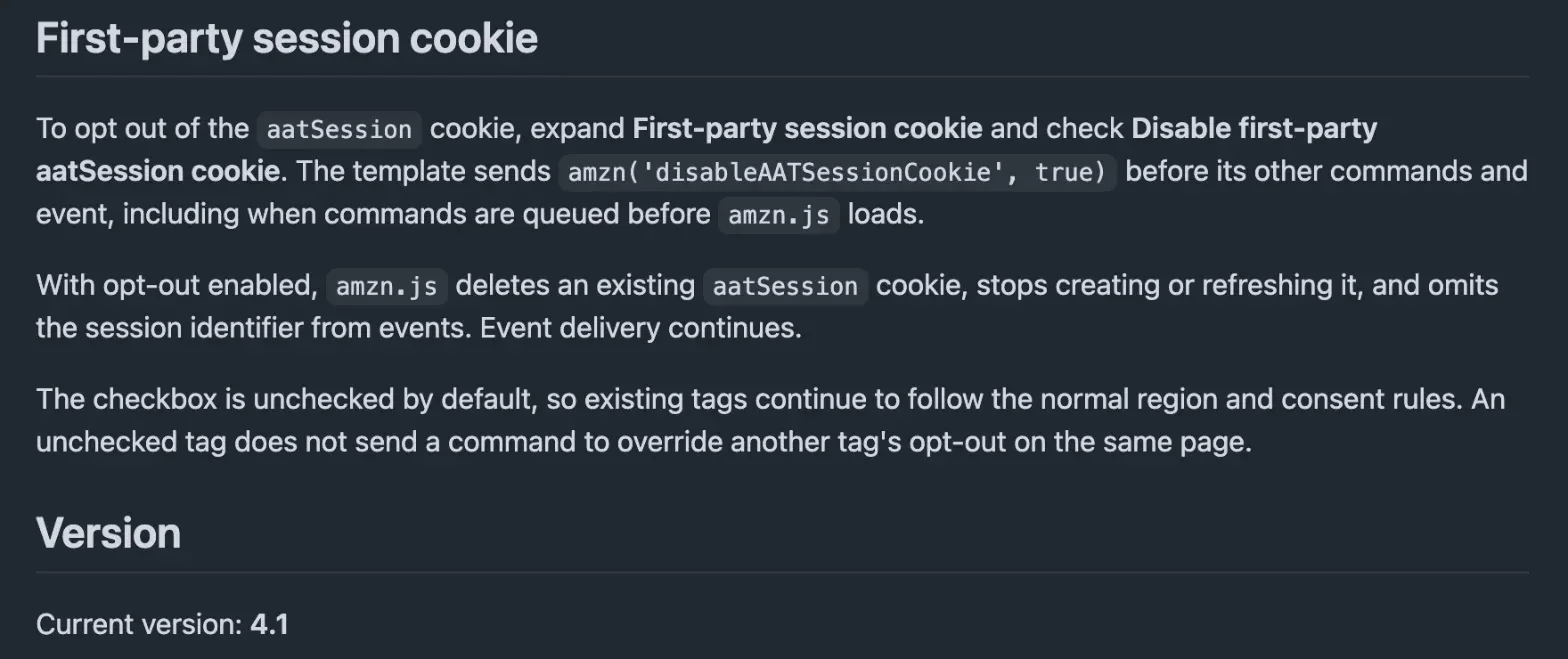
It adds a “Disable first-party aatSession cookie” checkbox, in a section called “First-party session cookie”.
The README says the box is unchecked by default, and that event delivery carries on with it ticked. So if you load the tag through Google Tag Manager, update the template and tick one box.
No code needed.
We also read the release note and the guide in full. Neither one says what happens when no consent signal is present.
Why it matters
If you send Amazon Ads traffic to your own store or lead pages, this cookie now lives on your domain, and that makes it yours to disclose in your cookie policy and your banner.
Do that first.
Do you want the cookie at all? Amazon says it makes attribution more reliable, and better matching is the reason you run the tag.
Still, turning the cookie off doesn’t stop your events. Here’s how I’d decide:
- Amazon is a real channel and your consent setup works: keep it on.
- Amazon is a small test, or you want a short cookie list: switch it off.
My read: ad tags keep asking more of your site, from Google ad tags in server-side GTM getting full IP addresses to Amazon, whose ad revenue hit $19.6B in Q3.
Check your tags. Then check again next month.
Common Questions
What is the aatSession cookie set by the Amazon Ad Tag?
It’s a first-party cookie the Amazon Ad Tag sets on advertiser websites in North America. It holds a session ID that links one visitor’s events on your site, and it expires 30 days after the visitor’s last page view.
How do I stop the Amazon Ad Tag from setting the aatSession cookie?
Add amzn("disableAATSessionCookie", true); to the tag’s base code on every page, before the first event. In Google Tag Manager, Amazon’s template version 4.1 has a “Disable first-party aatSession cookie” checkbox that does the same.
Does turning off the aatSession cookie stop Amazon Ads conversion tracking?
No. Amazon’s guide says events and hashed identity signals keep working. The tag deletes any existing aatSession cookie on your site, stops setting a new one and marks each event to show you turned the cookie off.


