How to Get Google to Index Your Site and Fix Pages Not Indexed
Our site launched on 31 October. Search Console shows 55 pages indexed and 113 not, and six of our guides sit under Crawled, currently not indexed. Here's what we check, and what we leave alone.

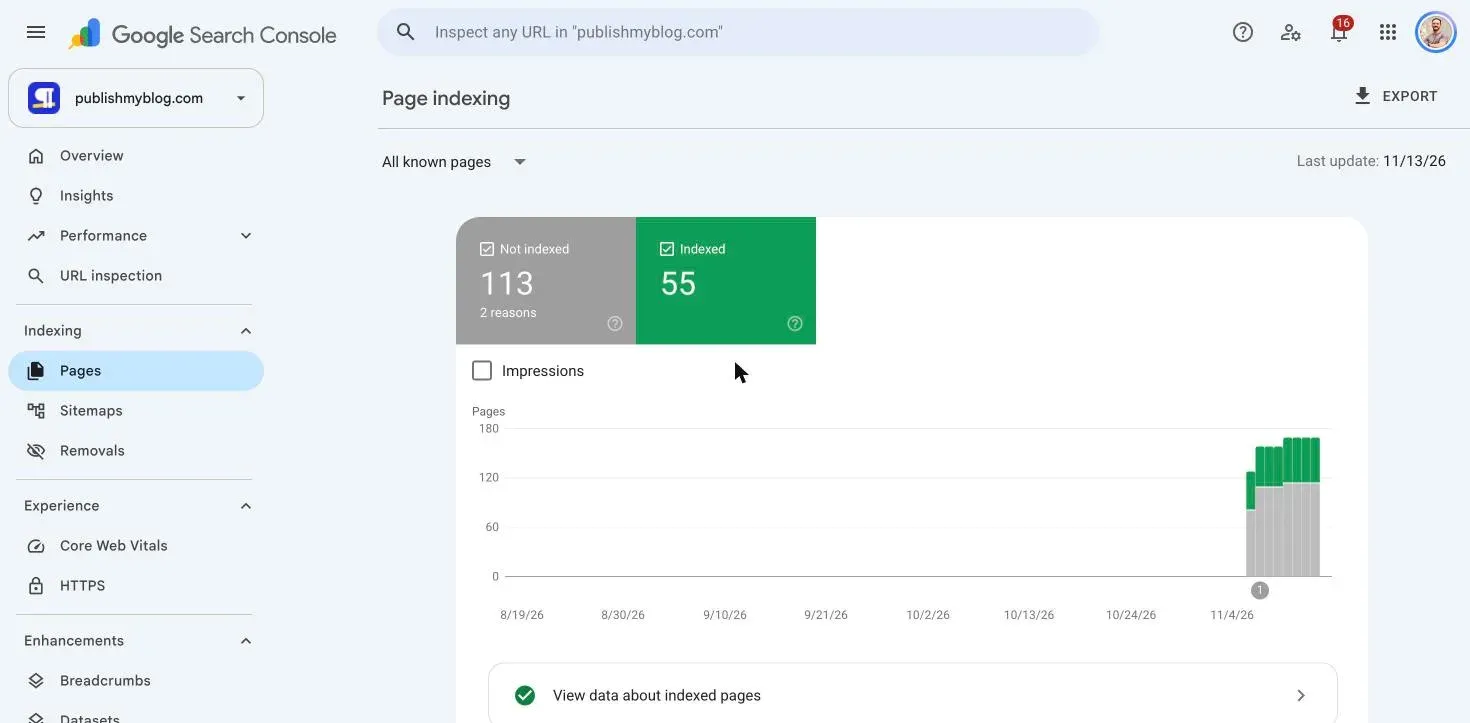
I wanted to know how to get Google to index your site when it’s brand new, so on 18 November I opened Search Console for ours, 18 days after publishmyblog.com went live.
55 pages were indexed, and 113 weren’t.
Eight of our own guides sat in that pile, six of them under Crawled, currently not indexed.
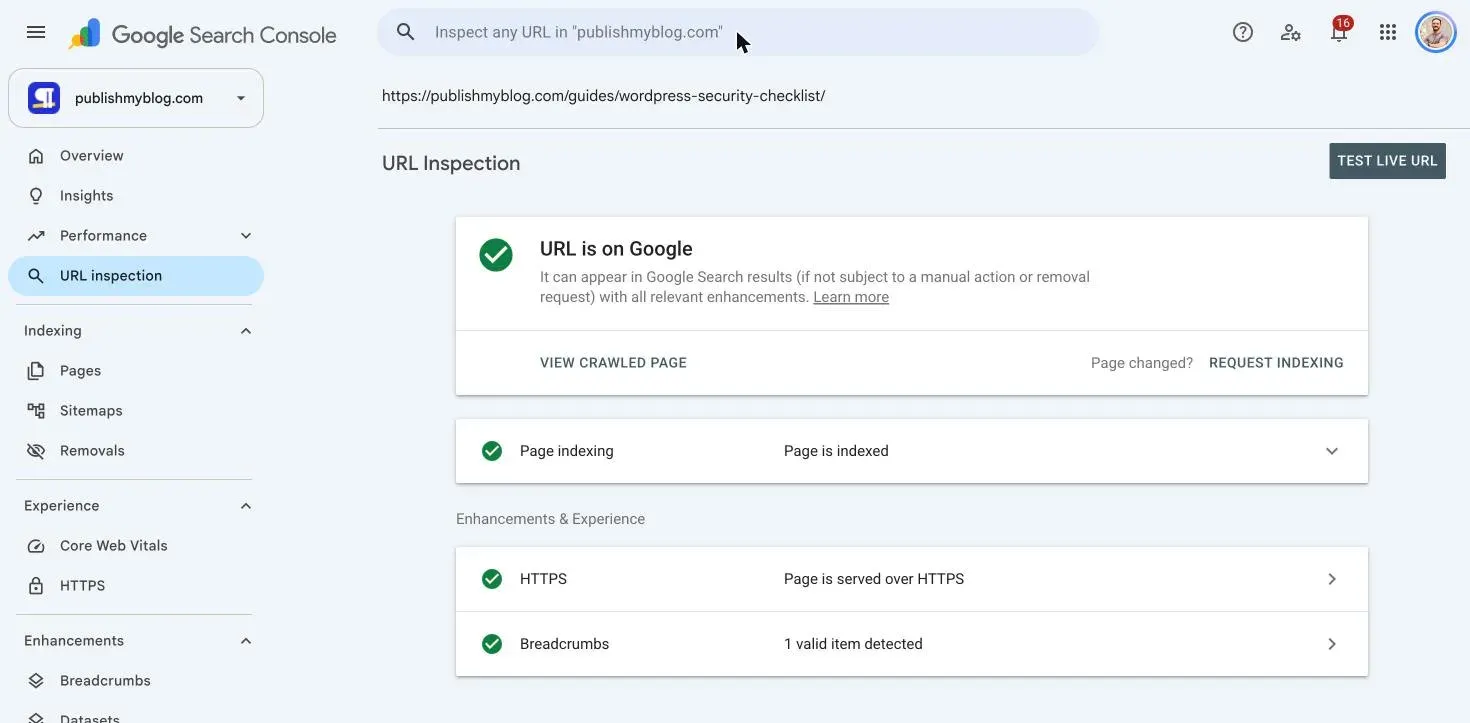
One was the WordPress security checklist, which surprised me, because URL Inspection says it’s on Google.
So how do you get Google to index your site? Nothing guarantees it. You make sure nothing blocks the page, list it in a sitemap, and link to it from pages Google already crawls.
Then you ask for indexing on the few URLs that matter, and you wait. Google says crawling “can take anywhere from a few days to a few weeks”.
Below: what our own report showed, the steps in order, and what Crawled, currently not indexed and Discovered, currently not indexed really mean.
What we checked
On 18 November 2026 I read four Search Console reports for publishmyblog.com. I clicked nothing that changes anything: no Request indexing, no Validate fix.
| Report | What it showed |
|---|---|
| Page indexing (last updated 13 November) | 55 indexed, 113 not: 100 Discovered, currently not indexed and 13 Crawled, currently not indexed |
| The same report on 6 November | 47 indexed, 80 not (76 Discovered, 4 Crawled) |
| Sitemaps | sitemap-0.xml read on 16 November, 154 pages found |
| Crawl stats (last updated 15 November) | 750 Googlebot requests, 66 ms average response, 96% refresh and 4% discovery |
Two things stood out, and the first is that our reports disagree with each other.
The Pages report listed our WordPress security checklist as Crawled, currently not indexed. URL Inspection said “URL is on Google”, last crawled 14 November.
It goes the other way too. Our GPT-6.1 Terra story shows as Discovered in the Pages report, yet URL Inspection calls it “URL is unknown to Google”, with “No referring sitemaps detected”.
It’s in our sitemap, which Google last read on 16 November.
Second, only 4% of Googlebot’s requests were to discover new URLs. Of its 750 requests:
- 96% refreshed pages it already knew.
- 60% were for images and 19% for HTML.
- 11% ended in a DNS error, and 90 went to other hostnames, like old subdomains from the domain’s previous owner that we left without DNS on purpose.
What I couldn’t check is why Google indexes one page and skips its neighbour, because Search Console doesn’t say and nobody outside Google can see it.
1. Check whether Google already has the page
A site: search is a rough check. For the full picture, paste the page’s complete address into the search bar at the top of any Search Console screen.
That’s the URL Inspection tool. You’ll get “URL is on Google” or “URL is not on Google”.
Under Page indexing you’ll see the sitemap or page that led Google there, the last crawl date and both canonicals.
Google’s URL Inspection help says this first view isn’t live.
Start with that verdict, then read the last crawl date. Did you fix something after that date? Then Google hasn’t seen your fix yet.
Check it: compare the user-declared canonical with the Google-selected one. If Google picked a different address, that’s the page to look at next.
2. Get Google to index your site: rule out blocks first
Before you wait on Google or rewrite anything, rule out the blocks you control:
- A noindex tag or header. Search the page source for
noindex; staging settings and SEO plugins leave it behind. - A robots.txt rule that matches the page. Google says robots.txt is the wrong tool for keeping a page out, too, because a blocked page can still get indexed from links. Use noindex for that.
- A canonical tag that names another page as the main version, so Google indexes that other page instead and treats yours as the copy.
- A status code other than 200.
- A soft 404, where a thin page looks like an error page to Google even though it returns 200.
Then click Test live URL in URL Inspection to fetch the page as it is right now. You can also see the rendered page there.
That test has limits, though. Google says it can’t tell you whether the page counts as a duplicate, or which canonical Google will choose.
Check it: the live test fetches the page, finds no noindex, and “Indexing allowed?” says yes.
3. Put the page in a sitemap Google reads
A sitemap hands Google a list of your URLs, which helps a lot on a new site, and most platforms build one for you. WordPress has had its own at /wp-sitemap.xml since version 5.5.
Google’s sitemap documentation sets the rules:
- At most 50,000 URLs or 50MB per sitemap file. Split bigger ones.
- Full, absolute addresses, and only the canonical ones.
- Google ignores
priorityandchangefreq. It useslastmodonly when the dates are “consistently and verifiably” accurate, so don’t bump every date on every build.
Submit it in Search Console under Indexing, then Sitemaps, and add a Sitemap: line to your robots.txt, which Google’s documentation also lists as a way to tell it where the sitemap lives.
Submitting a sitemap is “merely a hint”, in Google’s own words. It puts the addresses in front of Google. Crawling them is still Google’s call.
Check it: the Sitemaps report says Success, with a recent Last read date and roughly the number of URLs you put in that file.
4. Link to it from pages Google already crawls
Google finds new pages through sitemaps and by following links from pages it already knows. Its guide to how Search works uses the example of a category page linking to a new blog post.
So a page with no internal links is easy for Google to put off.
Link every page you care about from at least one indexed page: your homepage, a section page, or an older article on the same topic.
Our indexed list is mostly the homepage and recent stories, so that’s where we link new work from.
Check it: the new page has a plain link from at least one page that URL Inspection shows as “URL is on Google”.
5. Request indexing for the pages that matter
In URL Inspection, click Request indexing. You need to be an owner or a full user of the property.
Google’s help says the page gets a quick check first, then goes into the indexing queue. Use it for a new page you care about, or one you just fixed.
There are two catches: there’s a quota, and Google says asking again for the same URL won’t get it crawled any faster.
For dozens of pages at once, use the sitemap instead, and let Google decide which ones to crawl.
And on a hosted platform? Google says Blogger, WordPress and the like usually tell search engines about new posts on their own, so check your platform’s help first.
Check it: a week later, URL Inspection shows a newer last crawl date.
6. Crawled, currently not indexed: what it means
Google fetched the page and decided not to index it, for now.
Its help page, rewritten around the start of November (we covered the change), says Google “doesn’t index all pages across the web” and calls this “a common message for many sites”.
That fits us only partly. Seven of our 13 Crawled, currently not indexed pages were guides or the guides page, and nine of the 13 show a last crawl on 14 November.
At least one of them is already indexed. So part of that list is the report running behind.
Google doesn’t say why it skipped a given page. If an important one stays there for weeks, this is the order I’d work in:
- Run URL Inspection and the live test, and rule out everything in step 2.
- Find the page Google did index for the same search. If yours says the same thing, merge the two or make yours clearly different.
- Make the page worth indexing. Answer the question in full, add something the other results don’t have, and link to it from your strongest pages.
- Request indexing once, then leave it alone.
Should you click Validate fix? Only for a fix you actually made. Ours started on 9 November and failed on 14 November, and Google says validation “typically takes up to about two weeks”.
7. Discovered, currently not indexed: what it means
Google knows the address and hasn’t crawled it yet.
Its help page says Google typically reschedules the crawl because it “was expected to overload the site”, which is why the last crawl date is empty.
That’s Google’s general reason for the status, not a reading of your server.
That’s where 100 of our 113 pages sit: 75 news stories, 13 link hub pages, seven section pages, three other pages and two guides.
Our server isn’t overloaded, though: Googlebot’s average response was 66 ms, so the likelier reading is that Google doesn’t want our pages badly enough yet.
Every site starts on the same “conservative” crawl limit, says Google’s crawl budget page.
That limit rises if the site stays healthy and Google wants more of it, and demand depends on things like size, how often you update, page quality and relevance.
Four things are in your hands:
- Cut the URLs Google doesn’t need, like tag pages, filters, sorted copies and old test pages. Google calls your URL inventory the factor “you can positively control the most”.
- Return 404 or 410 for pages you deleted, and fix soft 404s.
- Keep your server fast.
- Link to the pages that matter from pages Google already crawls (step 4).
Google wrote that crawl budget guide for sites with a million pages, or 10,000 that change daily.
It also names sites with a large share of Discovered, currently not indexed URLs, which sounds like us.
Our reports don’t prove a budget problem at 168 known pages, and they don’t rule one out either. I’d check the URL list, server health and internal links before blaming the budget.
What doesn’t help
- The Indexing API for blog posts. Google limits it to job postings and livestream videos, and says abuse can get your access revoked.
- Pinging your sitemap. Google announced in June 2023 that the ping endpoint would stop working six months later.
- IndexNow, if Google is the goal. It reaches Bing, Yandex, Naver, Seznam and a few others, and Google isn’t on the list of IndexNow engines. We use it for Bing anyway.
- Expecting every page in. Google’s report help lists “100% coverage” under what not to look for.
Why it matters
A page that isn’t indexed can’t rank or earn a click from Google. Google also requires a page to be indexed before it can be a link in AI Overviews or AI Mode.
So check indexing first, and keep working on the pages themselves while you wait.
My take, 18 days in: on a new site, most of the not indexed pile just needs time.
So rule out blocks once, submit your sitemap once, link new pages from indexed ones, and check again in a week rather than every morning.
Where it’s more than time, the cause is often on the site. Our technical SEO audit checklist goes deeper on step 2.
If you just launched, run the website launch checklist. Moved domains? Use the migration checklist.
Common Questions
How long does it take Google to index a new site?
Google says crawling takes “a few days to a few weeks”. Our report showed 47 pages indexed on 6 November, six days after launch, and 55 by its 13 November update.
Does Request indexing work?
It puts the page in Google’s indexing queue. Google also says a crawl request doesn’t guarantee inclusion “instantly or even at all”, and that asking twice won’t speed it up.
Why does Search Console say a page isn’t indexed when it shows up in Google?
The Pages report runs behind. Ours, last updated 13 November, still listed a guide that URL Inspection showed as indexed on 18 November, so check single pages in URL Inspection.


