llms.txt: What It Does, Who Reads It and How to Make One
Our own llms.txt got 19 requests in a week. Eight were Google Lighthouse runs, and only two came from real AI crawlers. Here's what the file is for, who it really serves and how to set one up in ten minutes.

I opened our Cloudflare logs on 14 November to see who actually reads the llms.txt file on publishmyblog.com. In seven days, it got 19 requests.
Eight were Google Lighthouse runs, and two came from real AI crawlers. The rest were browsers and a handful of SEO tools.
So is the file worth your time?
The short version: Google Search ignores llms.txt, and OpenAI’s, Anthropic’s and Perplexity’s crawler pages don’t say their bots read yours.
It’s still cheap to keep, and it sees most use on documentation sites, where coding agents go looking for the right page before they write a line of code for someone.
Below, you’ll set one up, by hand or with a plugin, and see who fetches it.
What we checked
On 14 November 2026 I pulled every request for our llms.txt from Cloudflare’s analytics, for 7 to 13 November (UTC). Here’s who asked for it:
| Who asked | Requests |
|---|---|
| Lighthouse runs (Chrome-Lighthouse user agent, from Google’s addresses) | 8 |
| Browser user agents (Chrome, Safari on iPhone) | 5 |
| SEO and site-scanning tools (SEOJuice, BuiltWith, PipericBot, ShapBot) | 4 |
| GPTBot, OpenAI’s training crawler | 1 |
| ClaudeBot, Anthropic’s training crawler | 1 |
I matched both crawler visits against the IP lists OpenAI and Anthropic publish. Both were genuine.
Now compare that with the rest of their week.
Requests under the GPTBot name came to 144 that week and under ClaudeBot’s to 317, so our llms.txt was a single fetch in a long list of URLs for each of them.
OAI-SearchBot, the crawler behind ChatGPT search, made 686 requests under its name, 80 of them for robots.txt. It never asked for llms.txt.
Our file also links to markdown copies of our latest 100 news stories and every guide.
All our markdown copies got 457 requests:
- Amazonbot fetched 43, GPTBot 10, OAI-SearchBot 10 and ClaudeBot 9, all checked as genuine (Amazon’s by reverse DNS).
- A bot calling itself ElevenlabsCrawler asked for 64.
- Most of the rest came from browser-like user agents we can’t name.
So agents do read clean markdown when it’s there.
We can’t tell whether they found those copies through llms.txt or through the link on each article page, and the logs don’t say what any model did with them afterwards.
One gap on our side: we don’t send the rel="describedby" link the August 2026 proposal recommends, so an agent on one of our articles gets no pointer back to the file.
Cloudflare samples some of this data.
Read it as one site’s week, and expect yours to look different.
1. Know what llms.txt is, and isn’t
llms.txt is still only a proposal.
Jeremy Howard published it on 3 September 2024 and rewrote it as v2 in August 2026, per llmstxt.org.
It’s a plain markdown file at /llms.txt, or at a subpath like /docs/llms.txt, that tells an AI agent what your site is and links to the pages worth reading.
The proposal says it’s meant to be read on demand, when an agent needs to look something up while it helps a user, and it expected that use to matter more than training.
Three files sit at your site’s root, and they do different jobs:
| File | Its job | Can it block a bot? |
|---|---|---|
| robots.txt | Tells crawlers what they may fetch | Yes, for crawlers that follow it |
| sitemap.xml | Lists every indexable page for search engines | No |
| llms.txt | A short, curated reading list for AI agents | No |
Want to keep a bot out? llms.txt can’t block anything. That job belongs to robots.txt and to the bot rules in your CDN, and our guide to blocking AI crawlers walks through both, bot by bot.
2. Decide whether you need one
Who reads the file, then? Every llms.txt pitch skips that part.
Google’s answer is plain. Its AI optimization guide lists llms.txt among things you can ignore for Search, AI features included.
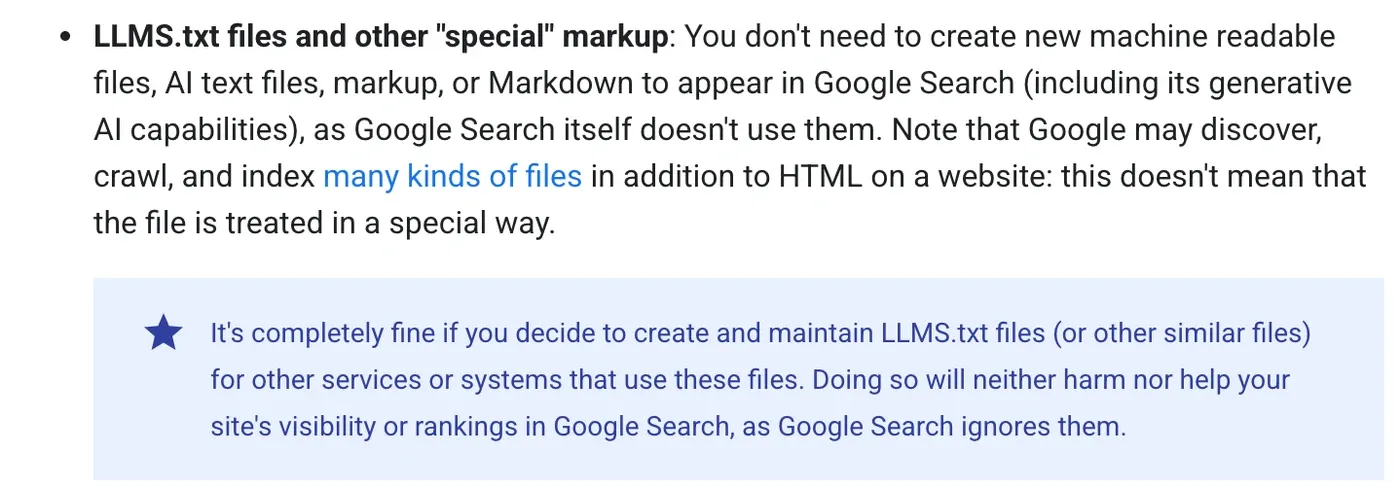
Keeping one, Google says, will “neither harm nor help your site’s visibility or rankings in Google Search.” It’s fine to keep a file for other services that use it.
I also read the crawler pages of OpenAI, Anthropic and Perplexity on 14 November. None says its bots read other sites’ llms.txt files.
Yet OpenAI, Anthropic and Google’s Gemini API all publish one for their own developer docs, so they use the format on their own pages even though their crawler pages say nothing about yours.
That fits what the proposal itself says: the files are used most heavily for software documentation, where coding agents follow them.
Then there’s Chrome. Lighthouse has an experimental Agentic Browsing category, and one of its checks looks for llms.txt.
That fits our logs: Lighthouse was our file’s most frequent reader, with 8 of the 19 requests.
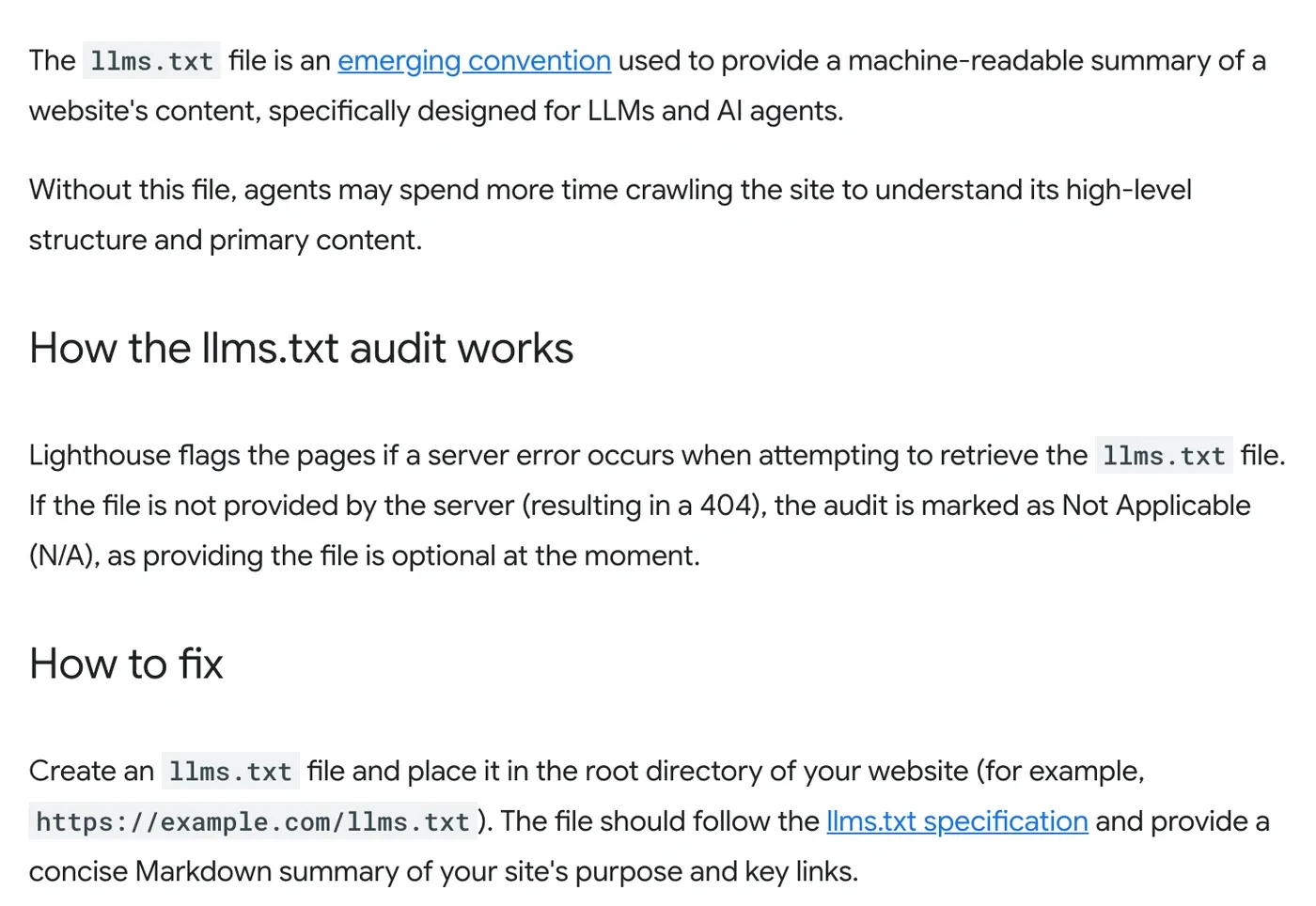
A missing file is marked not applicable, and a server error when fetching it gets flagged. Testing that category needs Chrome 150 or later, per Google’s scoring page.
So here’s my call by type of site:
| Your site | My call |
|---|---|
| Docs, API reference or a SaaS help centre | Yes, with markdown copies of each page |
| Blog or news site | Optional. Let your SEO plugin make it |
| Online shop | Optional. List policies, shipping and top categories |
| Small business site | Skip it unless your platform makes one for you |
Don’t expect traffic from it. In our logs it brought two crawler visits in a week, and your site will see its own numbers.
3. Write the file by hand
The spec wants its parts in a fixed order. Only the first heading is required:
- An H1 with your site’s name.
- A blockquote with a short summary of what the site is.
- Optional paragraphs or lists with more detail, but no headings.
- H2 sections, each a list of links written as
[name](url), with an optional colon and a note.
A section called “Optional” is a convention for links an agent can skip. Since v2, it’s only a convention, with no special meaning for tools.
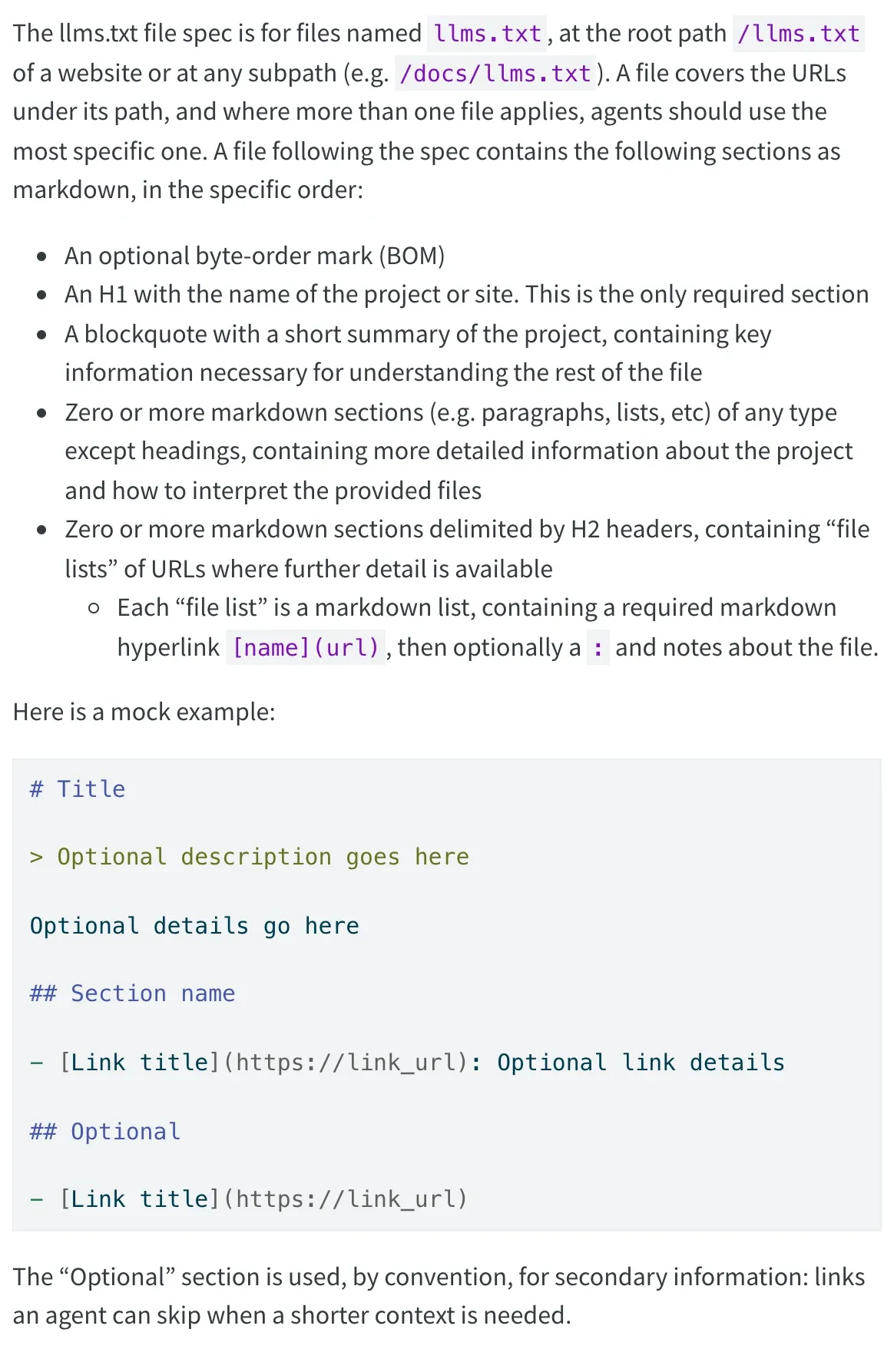
This is a trimmed copy of ours, which a script rebuilds every time we publish:
# PublishMyBlog

> Daily news for people who build, grow and earn from websites: AI, SEO, website tools, marketing tech, creators and SaaS. Written by Saeed Shahriar.

Every article is available as markdown: add index.md to its URL, or request the article URL with the header Accept: text/markdown.

## Sections

- [AI](https://publishmyblog.com/ai/): AI tools, models and search for website owners.
- [SEO](https://publishmyblog.com/seo/): Search news and practical guidance for growing visibility.

## Latest news

- [OpenAI Launches ChatGPT Wallet So Its Agents Can Pay for You](https://publishmyblog.com/ai/chatgpt-wallet-agent-purchases/index.md): ChatGPT Wallet lets OpenAI's dots agents pay on store websites...
A few rules make yours useful rather than a sitemap with a new name:
- Curate. The proposal wants the file small enough to fit in an agent’s context, with the detail behind the links.
- Link only public pages you’d want quoted: no logins, no noindexed pages, no old offers. Anyone can read the file and every markdown copy it points to.
- Write one plain line per link that says what the reader gets there.
- Name the file exactly
llms.txt, all lowercase, and put it in your site’s root folder.
Then test it the way llmstxt.org suggests. Give an AI assistant only your llms.txt and ask it questions about your business. Does it find the right page?
4. Let your platform generate it
On most platforms you don’t have to write a line yourself, since the SEO plugin or site builder you already use can make the file and keep it up to date for you.
Here’s where the switch lives, from each company’s own help page:
| Platform | Where to turn it on | What it lists | Watch for |
|---|---|---|---|
| Yoast SEO (WordPress, also Shopify) | Yoast SEO, Settings, Site features, AI tools, llms.txt | Your 5 most recently updated posts and pages (posts only if published in the last 12 months), cornerstone content first, plus your 5 biggest categories and tags | Not on multisite. It won’t overwrite an llms.txt that’s already there |
| Rank Math | Rank Math SEO, Dashboard, LLMS Txt module, then General Settings, Edit llms.txt | The post types and taxonomies you choose, 100 items by default | Empty until you configure it. Noindexed posts are left out |
| AIOSEO | Its LLMs.txt Generator | Recent posts in llms.txt, or all content in llms-full.txt | llms-full.txt and the markdown settings need AIOSEO Pro |
| WordPress.com | Jetpack, SEO, GEO tab (Premium plan and up) | Site title, tagline, published posts and pages with summaries | No file while you discourage search engines. An uploaded file (Business or Commerce, by SFTP) replaces it |
| Wix | SEO & GEO, Tools and settings, Go to llms.txt | Generated and kept up to date for you | Needs an upgraded site, a custom domain and search indexing on. Editing it stops the automatic updates |
| Mintlify docs | On by default | Every docs page except hidden and noindexed ones, plus llms-full.txt | A custom file overrides the generated one |
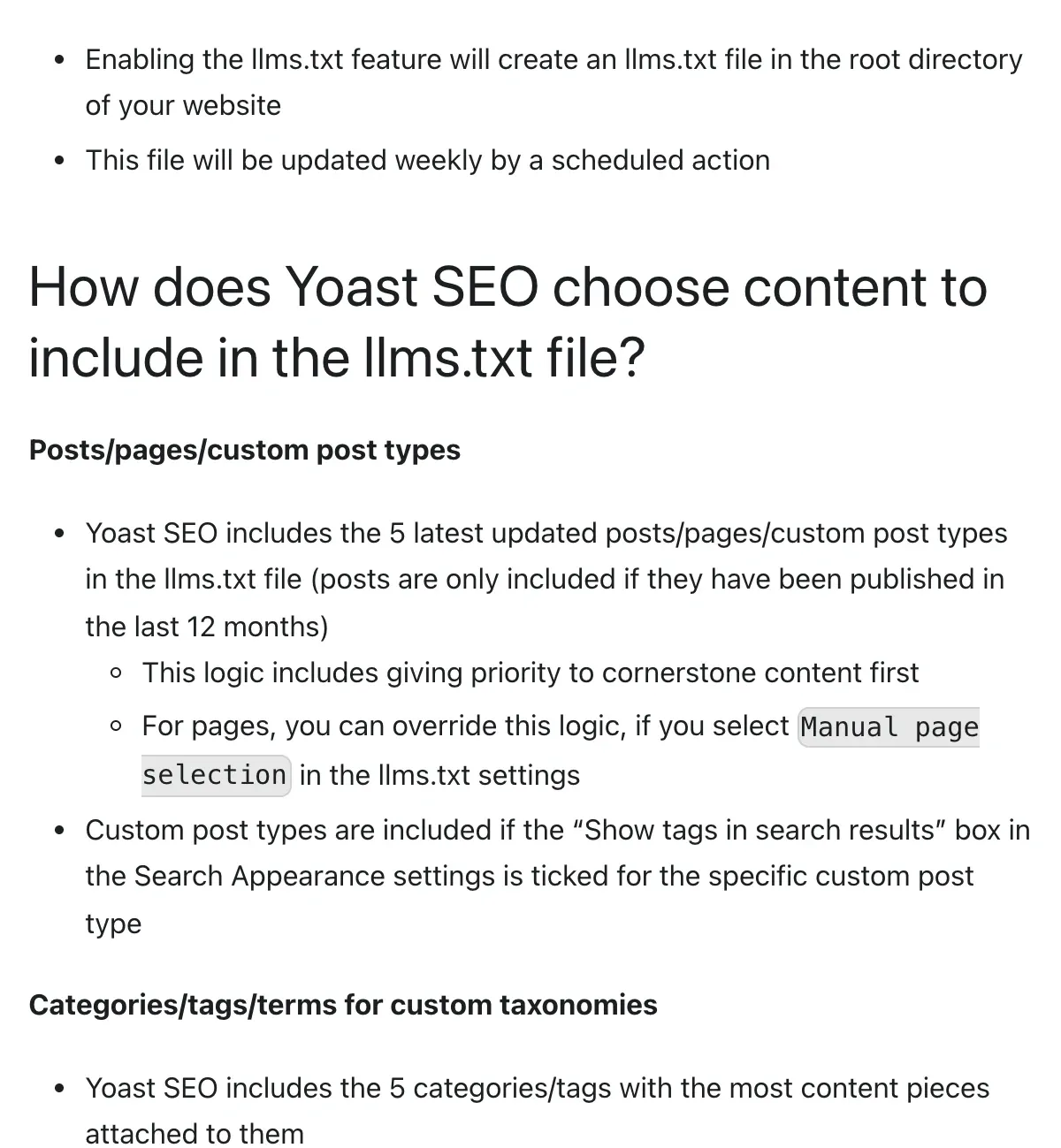
Yoast refreshes its file weekly, per its functional specification.
For a busy blog that publishes every day, five recent posts say very little about who you are or what you sell, so pick your key pages by hand in its manual mode.
Keep one generator and switch off the rest. Yoast won’t overwrite an llms.txt file that’s already on the server, but its own file wins over one another plugin serves on the fly.
On WordPress.com an uploaded file wins over the generated one.
5. Add markdown copies and discovery links
The v2 proposal goes further than one file. It suggests a clean markdown version of each important page.
That copy sits at the same URL with .md added or swapped in: page.md or page.html.md, and index.md for a folder URL.
Then two links help an agent find them:
rel="alternate" type="text/markdown"on a page points to its markdown copy.rel="describedby"points to the llms.txt that covers the page.
Both can sit in your HTML <head> or go in an HTTP Link header, which your server or CDN can add without touching your pages.
Ours puts the first in each article’s HTML head and doesn’t send the second yet.
We also serve the markdown at the article URL itself to any request that asks for text/markdown. Our logs can’t show that header, so those requests hide among the page views.
Want to see what agents do once they land? Microsoft Clarity’s Agent Activity dashboard shows it. For people who click through, see how to track AI traffic in GA4.
6. Skip llms-full.txt unless you run docs
You’ll see llms-full.txt offered next to llms.txt. It isn’t in the proposal at all.
Mintlify’s version puts the full text of every docs page into one big file, and AIOSEO can build one for a WordPress site out of all your posts and pages.
For a product’s documentation, that’s handy for coding agents. For a blog, it’s your whole archive in one file, which goes stale the moment you edit a post and the generator doesn’t run.
7. Check it, then keep it honest
Five checks, about ten minutes:
- Open
yoursite.com/llms.txtin a private window. You want the text, with no login, no redirect chain and no error page. - Run
curl -sI https://yoursite.com/llms.txtand look for a 200 status and a text content type. A server error is what Lighthouse flags. - Click every link in it once. Each should open a live, canonical page.
- Search your CDN or server logs for
/llms.txtafter a week. Match any AI bot’s IP against its owner’s list, as our AI crawler guide shows, since fakes are common. - Re-check it after a redesign, a migration or a plugin swap, since any of them can replace or delete the file without warning, and do it with the rest of a technical SEO audit.
Then decide which agents you let in at all.
Cloudflare now lets you allow or block personal AI agents one by one, and llms.txt does nothing for an agent you’ve blocked.

Why it matters
I keep our llms.txt, and if a plugin makes yours, keep it.
But I’d never sell it to a client as an AI search tactic, and I’d be wary of anyone who sells it to you as one.
In my view, what gets you into ChatGPT, Claude and Perplexity answers is being crawlable by their search bots and having pages worth citing.
OpenAI says sites that opt out of OAI-SearchBot won’t be shown in ChatGPT search answers, though they can still turn up there as plain navigational links.
Our AI search guide covers that work. None of it depends on this file.
My read: llms.txt is one small part of a bigger shift, where sites get ready for agents that browse, compare and even pay for the people who send them.
WordPress is targeting built-in AI agent access in 7.3, and Lighthouse already audits for agents.
Still, agents are rare visitors today. Uber said AI agents booked just four rides.
Ten minutes on llms.txt is fine. A week isn’t.
Common Questions
Does Google use llms.txt for AI Overviews or AI Mode?
No. Google’s AI optimization guide says Google Search doesn’t use llms.txt files, including its generative AI features, and that keeping one neither helps nor hurts your rankings.
Do ChatGPT and Claude read the llms.txt file on my website?
Nothing official says they do. OpenAI’s and Anthropic’s crawler pages don’t say their crawlers read your llms.txt. On publishmyblog.com, GPTBot and ClaudeBot each fetched ours once between 7 and 13 November 2026.
What’s the difference between llms.txt and robots.txt?
robots.txt tells crawlers what they may fetch, and well-behaved crawlers follow it. llms.txt is a reading list for AI agents with no power to block anything. Use robots.txt or your CDN to keep bots out.


