How to Track AI Traffic in GA4 and Find the Visits It Misses
We read 28 days of our own GA4 and clicked through to our site from ChatGPT, Perplexity and Claude. ChatGPT's link carried a tag, Perplexity's a referrer, and Claude's nothing at all.

I opened our GA4 property on 15 November to track AI traffic in GA4 the lazy way, with no setup and only the reports Google already gives you.
About one session in ten came from an AI assistant. Every one of those AI visits came from ChatGPT.
Not one came from Claude, Perplexity or Gemini.
Does that mean no other assistant sends us anyone? Not quite. GA4 only names an AI visit when the click carries a referrer or a tag, and some assistants send neither.
Below: the AI channel GA4 already gives you, your own channel for what it drops, and where the rest go.
What we checked
On 15 November 2026 I read our Traffic acquisition report for the last 28 days, 18 October to 14 November. The site only went live on 31 October, so it’s closer to two weeks.
| What GA4 showed | Sessions |
|---|---|
| All sessions | 283 |
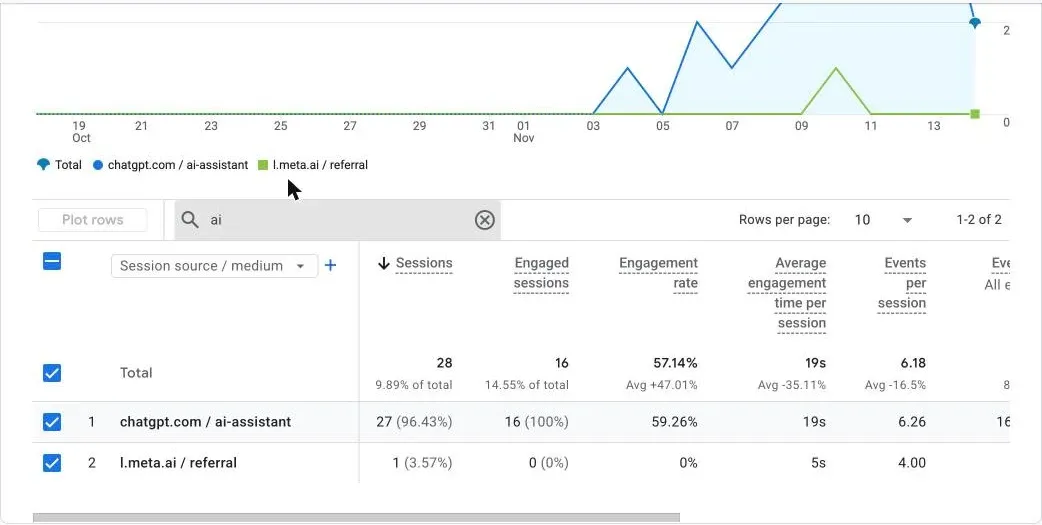
AI Assistant channel, all of it chatgpt.com / ai-assistant | 27 |
l.meta.ai / referral (Meta AI), filed under Referral | 1 |
| Anything from Perplexity, Claude, Gemini, Copilot, Grok or DeepSeek | 0 |
Small numbers. Still, one stood out.
Those 27 ChatGPT sessions brought in 4 of our 5 key events for the whole period, while the 51 sessions from organic search brought in none.
Then the click test, in desktop Chrome.
I asked each assistant for one of our guides, clicked its link and read the address and referrer our page received:
| Assistant (desktop web) | Tag on our URL | Referrer our page got |
|---|---|---|
| ChatGPT, with search | ?utm_source=chatgpt.com | None (the link is marked noreferrer) |
| Perplexity | None | https://www.perplexity.ai/ |
| Claude (web search off, so I asked it to print the link) | None | None |
So ChatGPT’s click carried a tag, Perplexity’s a referrer, and Claude’s click carried no referrer and no tag.
That’s what each click gave GA4: a referrer or a tag, or neither. Which channel each one got, I didn’t see.
What I couldn’t test:
- Gemini. Its link had no tag either, but my click never produced a page view I could see.
- Copilot, which asked me to sign in.
- Grok, DeepSeek and Meta AI, which I didn’t finish.
- Phone apps of any assistant.
Realtime showed all three page views within minutes, but its source card only offers first-user dimensions, so it can’t show which channel each click got.
Google also says GA4 doesn’t start a new session when a new traffic source turns up, so three clicks in three minutes from one browser can’t be split by session anyway.
Our setup matters too.
GA4 loads a moment after the page, and visitors in the EU, UK and Switzerland don’t reach our reports until they accept the cookie banner.
Our team’s visits are filtered out as internal traffic, but my test browser wasn’t flagged as internal, so those clicks count like anyone else’s in the reports.
1. Track AI traffic in GA4 with the AI Assistant channel
You may not need to build anything at all.
Google added an AI Assistant channel to the default channel group in GA4 on 13 May 2026, according to the What’s new page for Google Analytics.
Open Reports, then Acquisition, then Traffic acquisition, and the AI Assistant channel gets its own row there once the first matching visit shows up in your reports.
Here’s how Google defines the AI Assistant channel on its default channel group page:
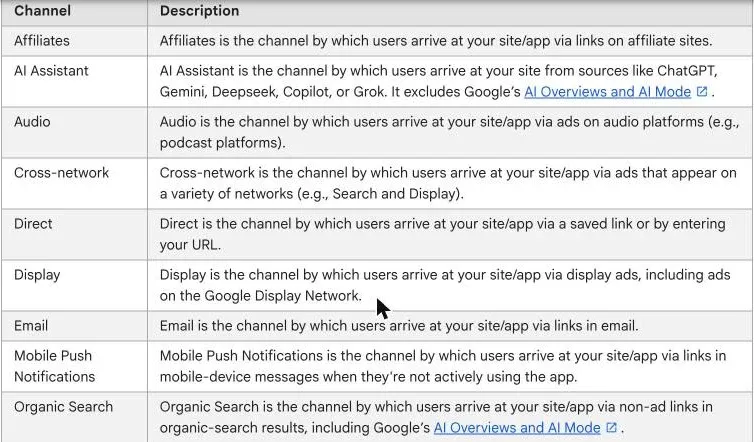
When a visit’s referrer matches Google’s list of AI assistants, GA4 sets its medium to ai-assistant and its campaign to (ai-assistant). Google doesn’t publish that list.
So the AI Assistant channel is a good default and a black box at once.
You only learn who’s on the list when an assistant sends you a visit.
Check it: in Traffic acquisition, the AI Assistant channel shows up for your date range. If it’s missing, nothing matched yet; that’s common on a small site.
2. See which assistant sent each visit
The channel lumps every assistant together.
To split them, click the dimension above the first column of the table and switch it to Session source / medium, which shows each referring site and its medium on its own row.
Then type ai into the table’s search box. On our site that left two rows: ChatGPT under ai-assistant and Meta AI under referral.
That second row is the lesson. Our one Meta AI visit, from l.meta.ai, came in with the medium referral, so GA4 counted it under Referral and the AI Assistant total missed it.
Search for perplexity, claude, gemini, copilot, grok and deepseek as well. Anything you find outside the AI Assistant channel is an AI visit your default report undercounts.
Built a segment on Medium to catch AI visits? Recheck it, because a rule that expects referral can now miss them.
Check it: a saved Traffic acquisition view, by Session source / medium, that you open once a month.
3. Add a custom channel for what the default misses
If Perplexity, Meta AI or another assistant keeps landing in Referral, build your own channel group.
Google’s custom channel groups page says custom channel groups apply to your old data too, so you don’t lose the visits you’ve already had.
You need Editor access.
In Admin, under Data display, open Channel groups and click Create new channel group, and GA4 starts you with a copy of the default group.
If that copy includes Google’s AI Assistant channel, leave it as it is, so your ChatGPT numbers still match the default report.
Add a new channel called “Other AI assistants” with one condition, Source matches regex:
.*(chatgpt|openai|perplexity|claude|gemini\.google|copilot|grok|deepseek|meta\.ai|mistral).*We haven’t run this pattern in our own GA4 yet, so treat it as a starting point.
Then click Reorder and drag your channel just below AI Assistant and above Referral.
Order matters. GA4 puts each visit in the first channel it matches.
A channel below Referral never sees the visits Referral has already taken, and one sitting above AI Assistant would take every one of your ChatGPT visits away from it.
Google’s own example is looser and starts with a broad “ai” match, so test any pattern against your real source list before you trust it.
Standard properties get two custom groups.
You can also make yours the property’s primary channel group, which then feeds the main reports with your rules from that day forward instead of Google’s.
Check it: open Traffic acquisition, switch the primary dimension to your new group, and look for
l.meta.aiorperplexity.aiunder “Other AI assistants” rather than Referral.
4. See what AI visitors do
A visit count tells you little on its own. Add Landing page as a secondary dimension on the AI rows to see which pages assistants send people to.
Then compare engagement rate and key events with Organic Search. On our site, ChatGPT visitors were fewer but triggered most of our key events.
That’s one young site, so treat it as a hint.
Check it: one row per AI source with sessions, engagement rate and key events, next to your Organic Search row.
5. Know the visits GA4 can’t label
Some AI traffic will never reach the AI Assistant channel, however careful your setup. There are four gaps:
- AI Overviews and AI Mode
- clicks with no referrer and no tag
- visitors who decline cookies
- bots fetching your pages
First, AI Overviews and AI Mode. Google counts them as Organic Search, so you can’t pull them apart in GA4.
Second, clicks with no referrer and no tag, like Claude’s, which GA4 has no way to tie to any AI assistant.
GA4 shows a visit like that as Direct, or under the source that visitor came from last time, since Google says a direct visit never overrides an earlier referrer.
Gemini seems to have dropped UTM tags too, and our test link from Gemini had no tag.
Third, visitors who decline cookies. Google models them only with at least 1,000 consent-denied events a day for 7 days, plus at least 1,000 daily consenting users on 7 of the last 28.
When there isn’t enough consented traffic to inform the model, Google says those events “aren’t reported.”
So a small site with European readers gets no modelled data at all, and every visitor who rejects the banner is simply missing, from ChatGPT or anywhere else.
Check it: the data-quality icon at the top of a report says whether GA4 is including estimated user data. If it says estimated data is unavailable, rejected visitors aren’t in your numbers.
Fourth, bots. An AI crawler fetching your page isn’t a person visiting it, and our guides to blocking AI crawlers and llms.txt show how to read those fetches in your logs.
Is Direct climbing on pages AI answers cite? Worth a look, though it proves nothing.
6. Fill the gaps outside GA4
GA4 counts people who click. For how often you’re shown or cited in AI answers, you need each platform’s own tool.
The Google and Bing reports count impressions or citations, and neither counts clicks.
| Tool | What it shows |
|---|---|
| Search Console, generative AI reports | Impressions in AI Overviews, AI Mode and Discover AI features, by page, country and device (Google) |
| Bing Webmaster Tools, AI Performance | Citations in Copilot, Bing’s AI summaries and some partners, with cited pages and grounding queries (Bing) |
| Microsoft Clarity, Agent Activity | What AI agents do on your pages (our story) |
Google rolled its generative AI reports out to all websites by 31 August 2026. They show impressions, not clicks, and we covered why AI click data in Search Console still has no date.
Where’s the click data, then?
Google’s AI features page puts AI Overviews and AI Mode traffic inside the Performance report’s “Web” search type, mixed in with everything else.
Pair those impressions with your Organic Search row in GA4. It’s the closest view of Google’s AI features you’ll get.
Why it matters
I like the AI Assistant channel.
It’s now the easiest way to track AI traffic in GA4. It turned something SEOs used to hack together with regex and a custom channel group into a free row.
But I wouldn’t report it to a client as “our AI traffic.”
It’s ChatGPT traffic plus whatever else sends a referrer Google recognises, and on our site that was ChatGPT alone.
So for a client I’d use three numbers together, side by side every month, so nobody mistakes one of them for the whole of their AI traffic in GA4:
- the AI Assistant channel
- a custom channel for what it drops
- impressions from Search Console and Bing, for the answers nobody clicked
Step 5 of our AI search guide puts this next to the rest of the work, and the AI Overviews 0.9% CTR test shows how little some of those impressions send.
Small numbers are fine.
Missing assistants aren’t dead ones.
Click through from each one yourself.
Common Questions
How do I see ChatGPT traffic in GA4?
Open Reports, Acquisition, Traffic acquisition and look for the AI Assistant channel. Switch the dimension to Session source / medium to see chatgpt.com / ai-assistant on its own. In our test, ChatGPT’s search link carried utm_source=chatgpt.com, which gives GA4 something to match.
Can GA4 track traffic from AI Overviews and AI Mode?
Not separately. Google’s default channel definitions put AI Overviews and AI Mode inside Organic Search. For their impressions, use Search Console’s generative AI reports.
Why is my AI traffic showing as Direct?
A click that arrives with no referrer and no tag shows as Direct, or under the source that visitor came from last time. In our test, a link clicked in Claude reached us with neither.


